Evidence
Watermark removal evidence: what you can still prove afterwards
Run a file through an AI watermark remover and the file that comes back is a different file. That is not a metaphor: every digest we computed changed completely. What does not change is the picture, and confusing those two things is where most arguments about edited images go wrong. We measured both. We hashed the bytes and we hashed the decoded pixels, we hid a note inside an image and watched the next save delete it, we built a 736-byte record and then broke it by flipping a single byte, and we ran a 32 × 32 fingerprint over every degree of damage we could produce to find out what a fingerprint can and cannot tell you.
Measurements come from headless Chrome 154.0.8037.92 on Windows, October 1, 2026, on synthetic scenes built from fixed seeds. Nothing was uploaded; every file stayed in the browser. The cleaning step itself is simulated — the “cleaned” frame is the same scene rendered without the mark — because everything measured here happens in the decode and encode path that every save goes through, not in the repair algorithm. Competitor pages were retrieved the same day (668,662 bytes across three sites, 48,069 bytes of visible text). Scope and limits are stated at the bottom.
The answer, first
- The file’s identity is destroyed; the picture’s is not. The marked input PNG hashed to
8fdf2709…; the PNG saved afterwards hashed to55d35cc0…. Two unrelated strings. Yet 1,757 of 2,000 randomly sampled 64-byte windows from the input still appear verbatim somewhere in the output — and the same test against an unrelated scene returns 0 of 2,000, so that number is not coincidence. - Two hashes, two different questions. A PNG and the same PNG carrying 63 bytes of invisible text have identical pixels — maximum channel difference 0 — so their pixel digests match (
aaf15d9f…) while their file digests do not (55d35cc0…against8b2e7ca3…). Hash the file to prove which file you have. Hash the decoded pixels to prove which picture you have. Neither one answers the other’s question. - A note hidden inside the image does not survive the edit. We wrote one into a PNG text chunk (81 bytes) and into a JPEG EXIF segment (97 bytes), confirmed it was there, then ran the file through one ordinary decode-and-save. Gone in both. The PNG chunk list fell from 516 chunks to 515. Anything you want to still be there afterwards has to live outside the image.
- The strongest artifact is the original you did not touch. Our own engine caps the longest edge at 1800 pixels, so a 12 megapixel input returns as 1800 × 1350 — 2,430,000 pixels instead of 12,000,000, and 361,104 bytes instead of 3,992,747 as JPEG. The small file cannot be turned back into the large one. Whoever holds the larger file holds something the other party cannot produce.
- A fingerprint identifies the subject, not the history. A 32 × 32 average hash moved 6 of 1,024 bits when the mark was removed and 185 of 1,024 bits for a completely different scene. The common 8 × 8 version moved 0 bits for every edit we tried, including a save at JPEG quality 0.20. It cannot see an edit. Do not use it as one.
What an edit does to a file
We built one 1200 × 800 scene at a fixed seed, drew a 45 percent opacity wordmark across the bottom right corner, and saved it. Then we saved the same scene without the mark and compared the two files byte by byte and pixel by pixel.
| Comparison | Input bytes | Output bytes | 64-byte windows still present (of 2,000 sampled) |
|---|---|---|---|
| Marked PNG → cleaned PNG | 2,104,502 | 2,101,545 | 1,757 (87.9%) |
| Marked PNG → an unrelated scene, PNG | 2,104,502 | 1,999,363 | 0 (control) |
| Marked PNG → itself | 2,104,502 | 2,104,502 | 2,000 (control) |
| Marked JPEG q0.92 → cleaned JPEG q0.92 | 338,603 | 337,103 | 62 (3.1%) |
| Marked JPEG q0.92 → unrelated scene, JPEG q0.92 | 338,603 | 337,728 | 2 (control) |
| Marked PNG → cleaned WebP q0.92 | 2,104,502 | 328,592 | 0 |
The controls are the point. Two different scenes share no 64-byte run at all, so 1,757 out of 2,000 is a real signal: under a lossless container, most of the compressed stream of a nearly identical image is produced again almost exactly. Under JPEG re-encoding it collapses to 3 percent, and across containers to nothing. Byte-level continuity survives a PNG-to-PNG save and not much else.

| Output container | Threshold | Pixels changed | Share of frame | Bounding box | Box as share of frame |
|---|---|---|---|---|---|
| PNG | 2 levels | 6,170 | 0.643% | 348 × 54 at (809, 706) | 1.958% |
| PNG | 16 levels | 5,868 | 0.611% | 347 × 54 at (810, 706) | 1.952% |
| JPEG q0.92 | 2 levels | 537,434 | 55.983% | 1200 × 800 | 100% |
| JPEG q0.92 | 16 levels | 14,713 | 1.533% | 1200 × 800 | 100% |
| Same file compared with itself | 2 levels | 0 | 0% | — | — |
That pair of rows is the practical reason to keep a lossless copy of anything you may later have to defend. In PNG the change has an address: a 348 × 54 rectangle in the lower right, 0.643 percent of the frame, and everything else is untouched. Save the same edit as JPEG and 537,434 pixels moved by more than two levels — 56 percent of the frame — even though only 14,713 moved enough to be visible. The record of what you changed is only as clean as the container you saved it in.
Two hashes, two questions
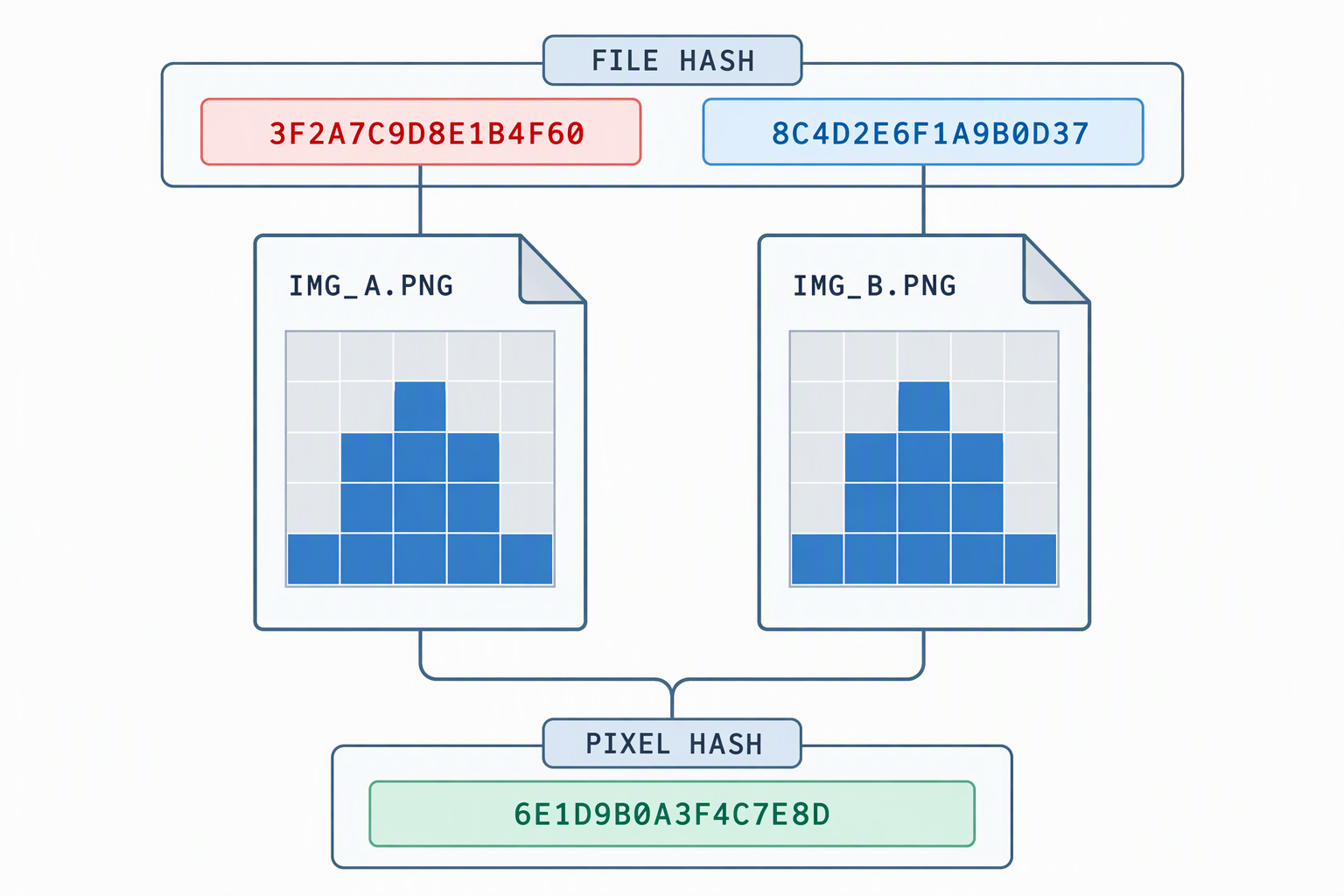
A file hash and a picture hash are both called hashes, which is why they get used interchangeably and why both sides of an argument end up certain and wrong. Here is the cleanest separation we could construct: one PNG, and the same PNG with 63 bytes of invisible text appended as a proper tEXt chunk. Same pixels, two files.
| What was hashed | PNG, 2,101,545 bytes | Same PNG plus a 63-byte text chunk | Match |
|---|---|---|---|
| The file | 55d35cc0c716fcaab073d2abc706f372 | 8b2e7ca3a0178751d784204a01df9977 | No |
| The decoded pixels | aaf15d9f87eb9ea9795c7949012fd68b | aaf15d9f87eb9ea9795c7949012fd68b | Yes |
| Pixel difference between the two | mean 0.000, max 0 levels out of 255 | Identical | |
Now the other direction, which is the one people actually run into. A JPEG at quality 0.92 and a PNG of the same frame look the same and are not the same: mean channel difference 2.044, maximum 146, and the pixel digests differ. So the pixel hash is strict — it will not tell you two files show the same picture unless they agree at every subpixel. It is a test of the picture, not of your eyes.
Is a hash reproducible?
A digest is only useful as evidence if someone else can compute it again. Two different questions again, with two different answers.
| Container | Same pixels, encoded twice | Saved file decoded and re-encoded |
|---|---|---|
| PNG | Byte-identical, 2,101,545 both times, digest match | Byte-identical, 2,101,545 → 2,101,545, digest match |
| JPEG q0.92 | Byte-identical, 337,103 both times, digest match | Not identical: 337,103 → 336,128, digest differs |
| WebP q0.92 | Byte-identical, 328,592 both times, digest match | Not identical: 328,592 → 325,326, digest differs |
The encoders are deterministic: give them the same pixels and they emit the same bytes. What breaks reproducibility is not the encoder, it is the input. Re-encoding a JPEG means feeding it pixels that were already quantised once, and the second pass produces a different — here, smaller — file. So a PNG digest can be recomputed from the PNG itself, while a JPEG digest is a statement about one specific file at one specific moment. If you need a digest that survives a round trip, keep a lossless copy.
Why the note inside the file disappears
The obvious place to keep a record is inside the image: a text chunk, an EXIF description, a comment field. It travels with the file, which is exactly why people try it. It also does not work, and here is the measurement.

| Step | PNG | Marker present | JPEG | Marker present |
|---|---|---|---|---|
| Before writing | 2,101,545 | — | 337,103 | — |
| After writing the note | 2,101,626 (+81) | Yes | 337,200 (+97) | Yes |
| After one decode-and-save | 2,101,545 | No | 336,128 | No |
| After two decode-and-saves | 2,101,545 | No | — | — |
The PNG chunk inventory tells the same story in one line: with the note, the file holds IHDR × 1, IDAT × 513, tEXt × 1, IEND × 1 — 516 chunks. After one save: IHDR × 1, IDAT × 513, IEND × 1 — 515 chunks. It does not survive one round trip, let alone several, and this is the same boundary we hit when we measured metadata across a full round trip: a canvas holds pixels, and everything else is dropped at the decode boundary before any editing happens. That is a privacy property most of the time. As an evidence strategy it is a dead end.
Where the record has to live
If the image cannot hold it, keep it beside the image. We wrote a plain JSON record holding the original’s digest and size, the result’s digest and size, the digest of the result’s pixels, the dimensions, the changed-pixel count with its bounding box, the fingerprint distance, and a timestamp.
| Property | Measured |
|---|---|
| Size of the record | 736 bytes, or 0.035 percent of the 2,101,545-byte image |
| Recomputing the digest and comparing it with the record | Match: yes |
| Same check after flipping one byte of the file | Match: no — digest becomes f72891542f1661e5…; the file still decodes, and now differs from the recorded pixels by mean 82.811, max 255 |
| Time to hash a 4 MP file (2450 × 1633, 1,352,440 bytes) | 2 ms median of 7 runs (2–4) |
| Time to hash that file’s pixels (16,003,400 bytes) | 20 ms median of 7 runs (19–20) |
| Time to hash a 12 MP file (4242 × 2828, 4,001,228 bytes) | 8 ms median of 7 runs (4–130) |
| Time to hash that file’s pixels (47,985,504 bytes) | 74 ms median of 7 runs (60–225) |
Two things worth taking from that table. The record is tiny — under a kilobyte next to a two-megabyte image — and it is cheap to make: even at 12 megapixels, hashing the file and its pixels together took about a tenth of a second on this machine. And it fails loudly: one flipped byte out of 2.1 million breaks the match, while the file still opens and looks almost the same. A record that cannot fail is not a record.
One honest caveat, because it matters more than the arithmetic: the timestamp in a record like this is one you wrote yourself. Nothing on this page makes a self-written timestamp into a notarised one. A sidecar proves that the file you have now matches the file you hashed then — it does not, on its own, prove when “then” was.
The fingerprint, and what it cannot do
A perceptual fingerprint is the other thing people reach for: reduce the image to a small grid of bits and compare grids. It is resolution independent, which makes it useful for “is this the same picture at a different size?” We tested four fingerprints against the marked original, up to a save at JPEG quality 0.20 and down to our own 1800-pixel cap.
| What was compared | Bytes | 8 × 8 average (of 64) | 16 × 16 average (of 256) | 32 × 32 average (of 1,024) | 8 × 8 difference hash (of 64) |
|---|---|---|---|---|---|
| The same file, re-read (control) | 2,104,502 | 0 | 0 | 0 | 0 |
| PNG, mark removed | 2,101,545 | 0 | 1 | 6 | 0 |
| JPEG q0.92, mark removed | 337,103 | 0 | 1 | 5 | 0 |
| JPEG q0.80 | 165,748 | 0 | 1 | 5 | 0 |
| JPEG q0.60 | 78,692 | 0 | 1 | 4 | 0 |
| JPEG q0.40 | 45,496 | 0 | 1 | 7 | 0 |
| JPEG q0.20 | 14,748 | 0 | 1 | 6 | 0 |
| WebP q0.92 | 328,592 | 0 | 1 | 4 | 0 |
| WebP q0.50 | 72,450 | 0 | 1 | 8 | 0 |
| A different scene entirely | 1,999,363 | 10 | 46 | 185 | 17 |
Read the last row as the yardstick. A completely different scene moves 185 of 1,024 bits; removing a watermark moves 4 to 8. The fingerprint is a subject detector, and it is a good one — it will tell you that a 1800-pixel thumbnail and a 12-megapixel original are the same photograph. What it will not do is tell you whether either one was edited. At 8 × 8 the distance is zero for every single edit on that table, including a file squeezed to 14,748 bytes at quality 0.20. If someone offers a fingerprint as proof that an image is unmodified, the honest reading is that they have measured the subject twice.
Keep the original
Everything above is about records. This part is about the artifact, and it is the part a working photographer will recognise. On a photography site in 2014 someone asked the version of this question that matters in practice: “How are copyright infringements verified when a photo is initially made in JPEG, not raw?” — 27 points, 7,324 views, still open. Their framing is exact: “Now one person has a JPEG and another person has a JPEG and how do we know who was the author?”
The highest-scoring reply there (45 points) reaches back before digital: “Before digital, the negative was de facto proof: there was (typically) only one, and the author had it.” The second (28 points) turns it into a rule you can act on: you can prove the picture is yours if you hold something that is not in the published picture — the larger file it was scaled from, a higher-definition version, a crop that still contains the rest of the frame, neighbouring frames from the same burst. Its last line is the whole strategy in five words: “never post all the pixels of the shot.”
That rule has a measurable version when a watermark tool is involved, because most of them shrink your image on the way through. Ours does: the engine shared by the watermark remover and the text removal page caps the longest edge at 1800 pixels, and the separate engine on the logo removal page caps at 2400.
| Ceiling | Output dimensions | Pixels | Share of input pixels | JPEG bytes |
|---|---|---|---|---|
| No cap | 4000 × 3000 | 12,000,000 | 100% | 3,992,747 |
| 2400 on the longest edge | 2400 × 1800 | 4,320,000 | 36.00% | 1,130,313 |
| 1800 on the longest edge | 1800 × 1350 | 2,430,000 | 20.25% | 361,104 |
The file you kept is 11 times the bytes and very nearly 5 times the pixels of the file the tool handed back, and that gap runs one way only. Which is why the first item on any record-keeping list is: do not overwrite the original, and do not let a download replace it. We have written about the related question of what you can still establish when the mark was put there by someone else on the photographer dispute page, and about the other side of it — how easily a mark you add can be removed — on the survival page.
What the tools tell you about any of this
On October 1, 2026 we retrieved the landing pages of three watermark removal services and searched their visible text — scripts and styles stripped — for any word in the evidence vocabulary.
| Page | Visible text bytes | evidence / proof / hash / record / manifest / provenance / metadata / audit / timestamp |
|---|---|---|
| watermarkremover.io | 13,486 | 0 — the string “prove” appears twice, both times inside “improve” |
| unwatermark.ai | 7,924 | 0 |
| phototune.ai/remove-watermarks | 26,659 | 0 |
Across 48,069 bytes of what these services actually say to a visitor, none of them mentions evidence, hashing, provenance, or keeping the original. That is not a scandal; it is not their job. It does mean that if you need a record of what you did, you will not get one from the tool — you have to make it, and it takes under a kilobyte.
A record you can actually keep
- Never edit the only copy. Duplicate first. Everything else on this list assumes the pre-edit file still exists; if it does not, no amount of hashing recovers it.
- Save the result losslessly once. In a PNG the change is a 348 × 54 rectangle you can point to; in JPEG q0.92 it is 56 percent of the frame. If you need to show what you changed, the lossless copy is the one that shows it.
- Write both digests down, not one. The file digest proves which file; the pixel digest proves which picture. We measured a case where they disagree completely and both are right.
- Put the record next to the file, not in it. 81 bytes of text chunk and 97 bytes of EXIF both vanished after one save. A 736-byte file in the same folder does not.
- Note what you can and cannot claim. The record proves the bytes you have now match the bytes you hashed. It does not prove when you hashed them, and no step here makes it do so.
- Keep the bigger original. 12,000,000 pixels down to 2,430,000 is a one-way door, and holding the larger file is a claim nobody downstream can make.
- Remember the flip side. A local tool leaves no history at all, so if you lose the download and the record, there is nothing to recover — which is the trade we measured on the no-signup page.
Frequently asked questions
Does removing a watermark change the file hash?
Always. Our marked input hashed to 8fdf2709… and the saved result to 55d35cc0…. If you need a digest that means something after an edit, hash the decoded pixels instead — and accept that it will only match byte-exact pixels.
Can a hash prove I did not change the picture?
A pixel digest can prove the pixels are identical, which is stricter than “looks the same”: our JPEG and PNG of one frame differ by mean 2.044 levels and their pixel digests do not match. A file digest cannot prove anything about the picture at all.
Can I hide a note inside the image so it travels with the file?
Not through a browser tool. We confirmed the note was written, then lost it in a single decode-and-save, in both PNG and JPEG. The browser’s canvas carries pixels; container metadata is dropped at the decode boundary.
Is a perceptual hash evidence an image was not edited?
No. At 8 × 8 the distance was 0 bits for every edit we produced, down to JPEG quality 0.20. At 32 × 32, edits moved 4 to 8 bits out of 1,024 while a different scene moved 185. Fingerprints compare subjects.
How big is a useful record?
Ours was 736 bytes against a 2,101,545-byte image. Making it cost 2 ms to hash a 4 MP file and 20 ms to hash its pixels; at 12 MP, 8 ms and 74 ms.
Do any watermark tools give you this?
None of the three we checked mention evidence, hashing, provenance, or keeping the original anywhere in 48,069 bytes of visible text. Assume you have to make the record yourself.
Scope and limits
- Everything measured here ran in headless Chrome 154.0.8037.92 on Windows on October 1, 2026, on synthetic scenes built from fixed seeds (gradient, soft blobs, line detail, per-pixel grain). They are not photographs of real subjects; a real camera file will have different byte counts, though not different behaviour at the boundaries described here.
- The cleaning step is simulated. The “cleaned” frame is the same scene rendered without the mark, so we are measuring what the decode and encode path does — which every save goes through — and not the behaviour of any repair algorithm. We make no claim on this page about how cleanly any tool removes a mark.
- Nothing was uploaded. All hashing was done with the browser’s own SubtleCrypto on a local page.
- The 64-byte window test samples 2,000 positions from the input at a fixed seed; the numbers are that sample, not an exhaustive scan. The unrelated-scene controls (0 of 2,000) are what make the 1,757 interpretable.
- Fingerprints are three average hashes (8 × 8, 16 × 16, 32 × 32) and one 8 × 8 difference hash, computed by drawing the decoded image into a small canvas. Different fingerprint designs will give different numbers; the point we measured is the gap between an edit (4–8 bits of 1,024) and a different subject (185), not any specific figure.
- Timings are medians of seven runs on a machine that was running other work. The 12 MP file-hash row ranged from 4 to 130 ms.
- The local caps quoted are from our own source: 1800 pixels on the longest edge in the engine shared by the home and text pages, 2400 in the engine on the logo page. They are per page, not site-wide.
- The discussion question and its answers are quoted from a photography Stack Exchange thread (question 100574, 27 points, 7,324 views; answers scoring 45 and 28). They are one community’s answers, not legal advice, and the thread’s context is authorship disputes rather than watermark removal.
- Competitor counts come from landing pages retrieved on October 1, 2026 and will change. They were counted after stripping scripts and styles. A word missing from a landing page is not a claim about that service’s capabilities.
- A sidecar record proves that a file matches a digest you wrote earlier. It does not, by itself, establish when you wrote it, and no measurement on this page changes that.