Ownership
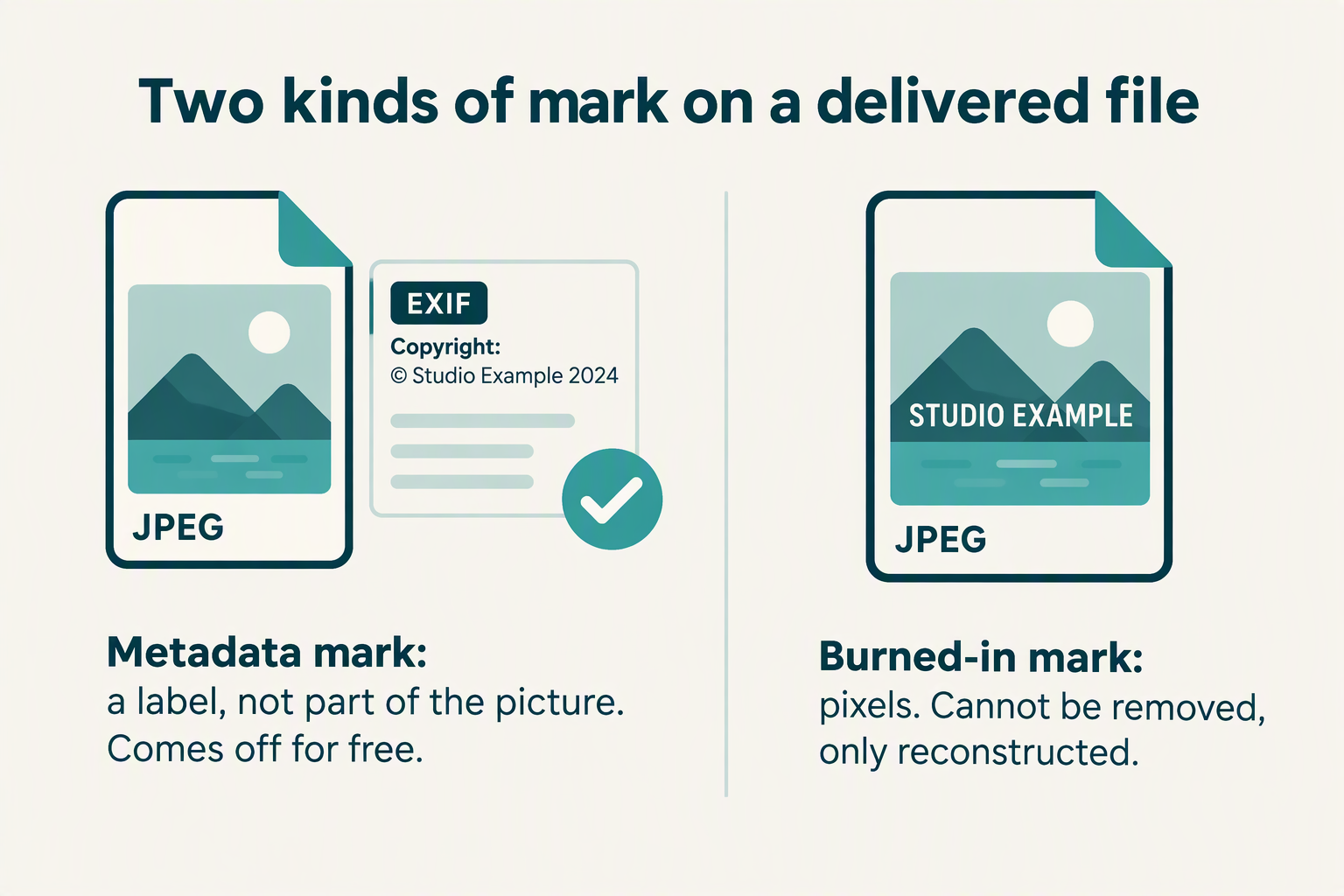
A mark in the file’s metadata comes off at a pixel cost of zero. A mark in the pixels does not come off at all.
Somebody delivered you photographs carrying a watermark you did not agree to. Before you run any tool over them, find out which of two things that mark is — because one kind is a line of text written beside the picture, removable without touching a pixel, and the other is part of the picture, where there is nothing to remove, only something to rebuild. Below: how to tell them apart without changing anything, what we measured when we put both kinds on one file and re-saved it three ways, and the arithmetic that decides how much of the original survives underneath a semi-transparent mark.
Measurements come from one headless Chrome 153 run on Windows, September 30, 2026, on synthetic scenes built from fixed seeds; no file left the machine and no network was used. Competitor pages were retrieved the same day (668,639 bytes across three sites). This page is not legal advice, and we are not lawyers. Scope and limits are stated at the bottom.
The answer, first
- Classify the mark before you change anything. A watermark can be metadata — a copyright or artist field written beside the pixels — or it can be pixels. We put both on one JPEG: the metadata string vanished from every re-save, while the burned-in wordmark came through at 0.987 to 0.992 of its original strength.
- The metadata kind needs no remover. Re-saving the file to PNG removed the copyright string and reproduced the picture exactly — maximum channel difference 0 across 960,000 pixels. You are not restoring anything; you are dropping a label.
- The pixel kind is arithmetic, not magic. A semi-transparent mark composites as o = (1 − a)u + a·m, which inverts to u = (o − a·m)/(1 − a). With the mark’s opacity known exactly, recovery cost us 0.74 levels out of 255 at opacity 0.35 and 2.67 at 0.90 in a lossless container.
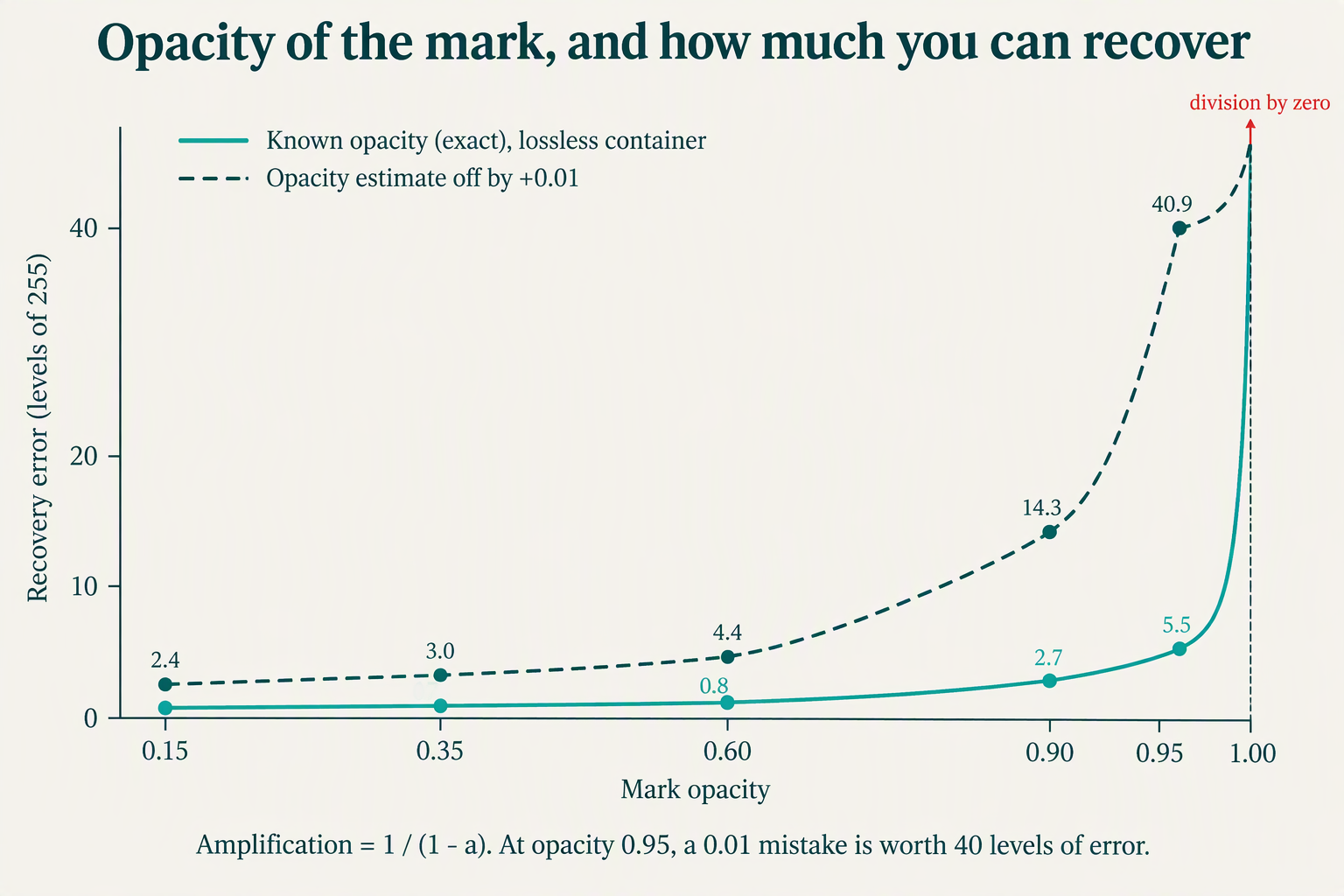
- Opacity above about 0.9 is where it stops working. Every error is multiplied by 1/(1 − a). At opacity 0.95 that factor is 20; a 0.01 error in your estimate of the opacity produced a mean recovery error of 40.86 levels, which is not a recovery.
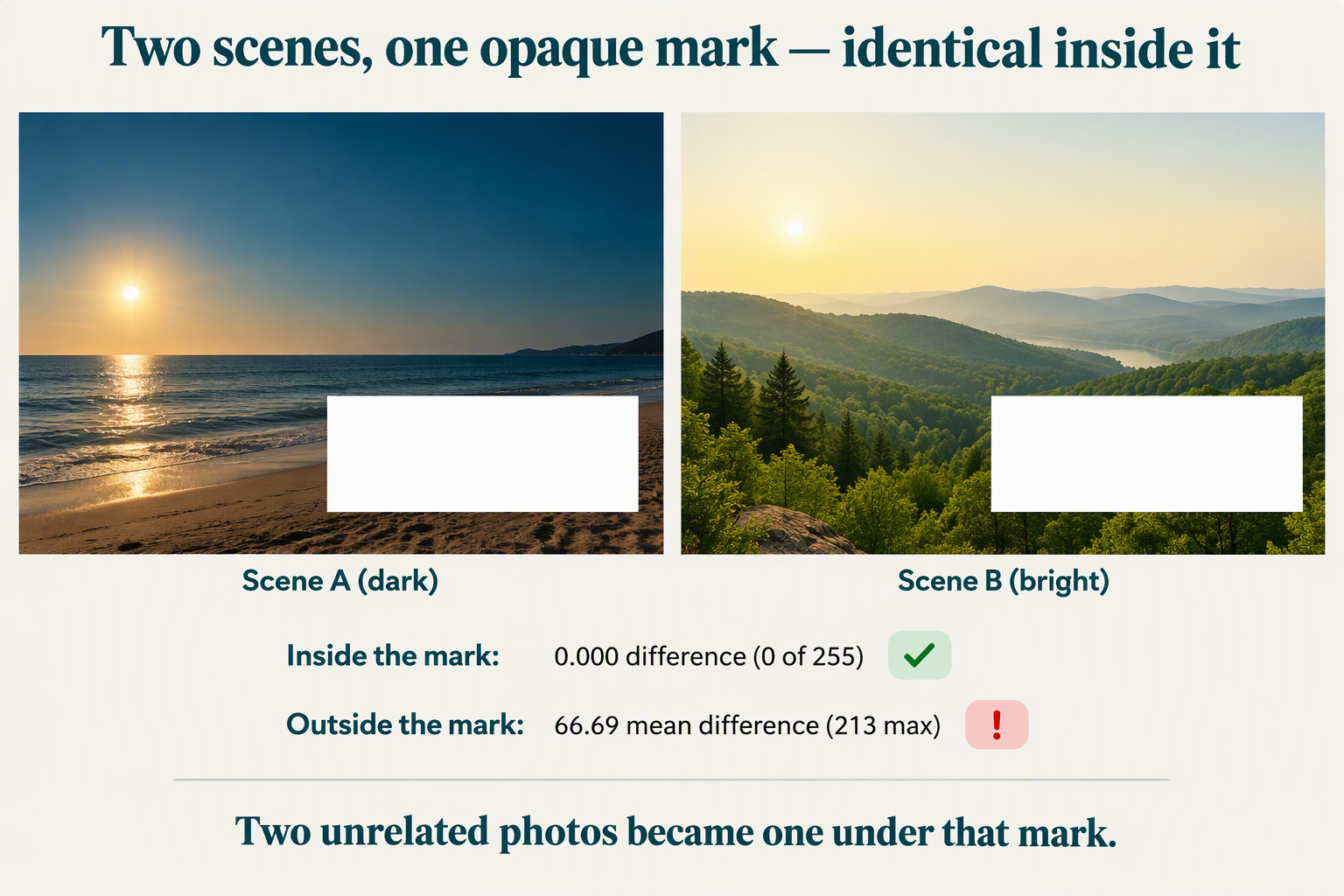
- At full opacity there is nothing to recover, and that is provable. Two entirely different scenes under the same opaque rectangle produced identical pixels inside it — maximum channel difference 0 — while differing by a mean of 66.69 outside it.
- None of this decides who owns the photographs. That comes from your agreement. What the file gives you is evidence, so hash the delivered bytes before you edit: 0.30 ms for a 12 MP JPEG, and one flipped byte changed 133 of 256 bits of the digest.
Where this question actually comes from
This is a real question with a real history, and it does not come from people trying to steal stock photography. It was asked on a photography site in February 2018, in eleven words of context:
“I just got married in November and my photographer put a watermark on every photo even though it was agreed to ahead of time not to. How do I get rid of those water marks?”
The question carries a score of −5 and 1,999 views, and it drew two answers. That minus sign is itself worth reading: on a site full of photographers, “how do I get rid of it” lands badly, because from the other side of the camera the mark is the only thing standing between a portfolio and a repost. The asker was not the villain of the story and was not treated as one either — the reaction is a reminder that this question has two sides, and that a tool cannot tell which side you are on.
It is also a question the commercial tools decline to engage with. Across 668,639 bytes of the three sites we compare against, read on September 30, 2026, here is what is there:
| Site | Page | Bytes | “photographer” | “copyright” | contract / permission / ownership / licence | “paid for” / “your own” |
|---|---|---|---|---|---|---|
| watermarkremover.io | / | 332,212 | 0 | 5, all in the footer line and interface strings | 0 | 0 |
| unwatermark.ai | / | 136,769 | 2, both in a customer testimonial | 1, the footer | 0 | 0 |
| phototune.ai | /remove-watermarks | 199,658 | 0 | 0 | 0 | 0 |
Read the middle columns carefully, because zero is the finding. Every one of the “copyright” hits is boilerplate: a company footer, a copyright year, a translation key. The only two mentions of photographers anywhere in that 668 KB are one customer saying the tool did a good job on her images. Not one of the three says anything about who has the right to remove a mark from a picture somebody else took, and not one mentions a contract, a licence, or permission. For a category built entirely on editing other people’s images, that is a large silence.
Step 1: which kind of mark is it
Three kinds exist in practice. The first two we measured; the third we did not, and we say so.
| Kind | What it is | Where it lives | How to check without editing | What removing it costs |
|---|---|---|---|---|
| Metadata mark | A text field naming the studio or asserting rights | Beside the pixels, in an EXIF or XMP block | Open file properties and look for a copyright or artist field | Nothing. Any re-save drops it. Measured pixel cost: 0 |
| Burned-in mark | Text or a logo composited into the image itself | In the pixel values | Zoom to 400%: it carries the same compression artifacts as the photo around it | The pixels underneath are gone. Everything beyond that is reconstruction |
| Display overlay | A mark drawn by a gallery or proofing page, not present in the file you download | Nowhere in the file | Compare the bytes you can download with what the page displays | Nothing, if it is genuinely not in the file — we did not measure this case |
The third row matters more than it looks. A proofing gallery that draws the studio name over every thumbnail on screen may be serving you files that are already clean. Before you do anything to the pixels, download one file and open it somewhere else — not in the gallery, in the operating system’s own viewer. If the mark is not there, you never had this problem.
What a re-save does to each kind, measured
We built a 1200 × 800 scene and put both kinds of mark on one JPEG: a copyright string and an artist string in a hand-built EXIF block plus a matching XMP rights statement, and a wordmark drawn into the pixels at 45% opacity. The finished file was 60,766 bytes. The wordmark touched 6,307 pixels — 0.66% of the frame — inside a bounding box covering 1.75% of it.
Then we pushed that file through the ordinary browser image pipeline three times, once per output container, and read the results back. “Mark strength” is a least-squares coefficient against the mark exactly as it was drawn: 1.000 would mean the mark came through perfectly, 0.000 would mean it was erased.
| Re-saved as | Output bytes | Encode time | Copyright string still in file | Burned-in mark strength | Pixel cost, mean / max |
|---|---|---|---|---|---|
| PNG | 623,390 | 31 ms | no | 0.992 | 0.000 / 0 |
| JPEG q0.92 | 63,931 | 11 ms | no | 0.992 | 0.088 / 20 |
| WebP q0.92 | 38,748 | 241 ms | no | 0.987 | 0.575 / 21 |
Two things in that table are the whole point of this section.
The metadata mark fell off every time, for free. Three containers, three clean removals, and in the PNG case the picture that came out was identical to the picture that went in — zero on every one of 2.88 million channel values. Nothing was reconstructed. A label was dropped. We ran the PNG re-save twice and got the same 623,390 bytes both times, byte for byte.
The burned-in mark came through every time, essentially intact. 0.992, 0.992, 0.987. Re-encoding did not weaken it, because re-encoding cannot — the mark is the picture. There is no container you can save to that separates them, and no setting that makes the mark fade. If the studio name is in your pixels, the only question left is how much of what sits underneath can be reconstructed, which is a question with an answer you can compute.
Step 2: if it is in the pixels, here is the arithmetic
A semi-transparent mark of one flat colour over a photograph is not a mystery; it is a weighted average. For every channel of every pixel inside the mark:
o = (1 − a)·u + a·m — where o is what you can see, u is what was originally there, m is the mark’s colour, and a is its opacity.
You know o — it is in the file. If you also know m and a, the equation turns around:
u = (o − a·m) / (1 − a)
That is the entire mechanism, and it has one property that decides everything: you divide by 1 − a. As the mark approaches opaque, that denominator approaches zero and every error you have — compression noise, a slightly wrong colour, a slightly wrong opacity — is multiplied without limit. We measured it. A uniform white rectangle over a textured region of a 1200 × 800 scene, recovered with the formula above and scored against the original pixels:
| Mark opacity a | Damage done | Amplification 1/(1−a) | Recovery, exact a, PNG | Recovery, exact a, JPEG q0.92 | If a is off by +0.01, PNG | If a is off by +0.01, JPEG | If a is off by +0.05, PNG |
|---|---|---|---|---|---|---|---|
| 0.15 | 21.308 | 1.18× | 0.615 | 1.497 | 2.354 | 2.800 | 9.749 |
| 0.35 | 50.456 | 1.54× | 0.741 | 1.825 | 3.024 | 3.614 | 12.928 |
| 0.60 | 87.055 | 2.50× | 0.819 | 2.344 | 4.411 | 5.094 | 21.548 |
| 0.90 | 131.152 | 10.00× | 2.666 | 7.721 | 14.259 | 15.887 | 99.699 |
| 0.95 | 138.076 | 20.00× | 5.517 | 13.419 | 40.861 | 50.197 | undefined |
| 1.00 | 145.533 | — | undefined | undefined | — | — | — |
Read the first two recovery columns together and the good news is real: with the mark’s colour and opacity known exactly, the arithmetic works. At opacity 0.35 the recovered pixels land within 0.74 levels of the original on average — below one step of an 8-bit channel, invisible. Even at 0.90, with exact knowledge, recovery lands within 2.67 levels.
Now read the columns to the right of them, which is where the good news dies. Nobody hands you the opacity. You estimate it, and the penalty for being wrong by one hundredth is 14.26 levels at opacity 0.90 and 40.86 at 0.95 — against a damage figure of 131 and 138. At that point you have not recovered the photograph; you have replaced one artifact with another of the same size. And at opacity 0.95, estimating 1.00 by mistake does not merely degrade the result, it makes the formula divide by zero. The recovery does not exist.
The practical reading: a faint mark over flat background is genuinely recoverable if you can obtain the mark layer separately — studios usually publish it, and it is often the same asset on every frame. A heavy mark over detail is not, and no amount of cleverness changes the denominator.
The opaque case, demonstrated rather than asserted
It is one thing to say an opaque watermark destroys what is under it. It is another to show it. We built two scenes that have nothing in common — different palettes, different shapes, different seeds — and put the same fully opaque rectangle over both.
| Region | Mean difference | Maximum difference |
|---|---|---|
| Inside the mark | 0.000 | 0 |
| Outside the mark | 66.691 | 213 |
Inside the rectangle the two files are the same picture. Not similar — identical, every channel, every pixel. Outside it they differ by an average of 67 levels out of 255. Two completely different photographs became one photograph under that mark, and the information that distinguished them is not merely hard to reach. It is not in the file. No tool, however good, can return what is not there; the best any tool can do is guess plausibly, which is a different thing from recovering, and the difference is the whole of what removal costs a picture.
Step 3: the ownership question is not in the file
Everything above is about what is technically possible. None of it answers whether you may do it, and we are not going to pretend otherwise: that comes from the agreement you signed, from what the studio’s terms said at the time, and from the law where you live. We are not lawyers and this is not legal advice. The general shape of the boundary — what a licence covers, why “I paid for the session” and “I own the negatives” are different claims — is set out on our page on when removing a watermark is lawful, and it is worth reading before you touch a file you might need to argue about later.
What the file gives you is evidence, and evidence is perishable. Two things are worth doing before any edit, and both are cheap.
Keep the delivered file exactly as it arrived, and work on copies. In a disagreement, the file the studio sent you is the one artefact both sides can be asked to agree on. An edited copy is not.
Record a hash of what you received. A cryptographic digest over the bytes turns “this is the file they sent” into something checkable later. It is also close to free:
| Image | Bytes | Digest time |
|---|---|---|
| 1 MP, 1224 × 816 | 58,383 | 0.30 ms |
| 4 MP, 2450 × 1633 | 122,956 | 0.20 ms |
| 12 MP, 4242 × 2828 | 245,800 | 0.30 ms |
| 24 MP, 6000 × 4000 | 375,182 | 0.40 ms |
The reason a digest works as evidence is that it is unforgiving in both directions. Flipping one byte out of 245,800 changed 133 of the 256 bits of the digest — 75ba1e24f818038f became d1fac41f99becccb. And re-encoding the delivered file to PNG, which changed no pixel at all, produced a completely different digest: 16980e67df1e5b9e against 46e4d2c4e328fb8d. That second fact is the one people miss. A picture that looks identical to the eye can be a different file entirely, and “it looks the same” is not a claim you can verify later.
One more thing worth knowing before you start: whatever you do to these files, the camera metadata will not survive it. That is measured separately on our page about what happens to EXIF data — including the copyright fields, which is a small irony given that the metadata mark is the one kind of watermark that comes off for free.
What to do, in order
- Copy the delivery somewhere safe and do not edit the originals. One copy to work on, one to keep.
- Hash what you received. 0.30 ms for a 12 MP file; a whole wedding delivery takes under a second.
- Open one file outside the gallery. If the mark is only drawn on the proofing page, you are finished.
- Check the file’s properties for a copyright or artist field. If the studio name is there, that part of the mark is metadata, and re-saving removes it without touching a pixel.
- If the mark is in the pixels, look at its opacity before anything else. Under roughly 0.6 there is something to recover if you can get the mark layer on its own. Above 0.9, and certainly at 1.0, there is not, and a tool that promises otherwise is promising a reconstruction.
- Settle the rights question first if you can. Asking the studio for the agreed clean files costs one email. Everything on this page is what to do when that email does not work.
The reverse question — whether a mark you put on your own work survives being removed — is measured on its own page, and the two are worth reading together, because they are the same mechanism seen from opposite ends.
Scope and limits
- Everything measured here ran in headless Chrome 153 on Windows on September 30, 2026, on synthetic scenes built from fixed seeds. No network request was made and no file left the machine.
- The mark used in the arithmetic test is a rectangle of one flat colour. Real studio marks are text and logos with antialiased edges, where the opacity varies per pixel, which makes recovery harder than anything in our table, not easier.
- The recovery figures assume you know the mark’s colour and opacity. In practice you estimate them, which is why the “off by” columns exist and why they are the ones to read.
- We did not test the third kind of mark — an overlay drawn by a gallery page rather than stored in the file — because doing so would require a specific proofing service. We describe it and give a check for it, and that is all.
- Competitor counts are from public pages retrieved on September 30, 2026, and will change as those pages change.
- This page says nothing about who owns your photographs. It describes what a file contains and what arithmetic can do to it.