Watermarks
Yes, someone can remove the watermark you added — here is what it costs them
A watermark is a lock, not a safe. In every case we measured, a plain edit available in any image program took most of the mark out of the picture. What a watermark actually buys you is not impossibility but price: it forces whoever wants your image to destroy part of it. Below are the measurements — how much of the mark survived each attack, how much picture content died with it, and which two choices move those numbers the most.
Measured on September 29, 2026 in Chrome 153 (headless, Windows) on a synthetic 1200 × 800 test scene, using canvas drawing and encoding. Every figure on this page is a real number from that run, not an estimate. "Damage" is always expressed in levels of 255, the same scale a pixel uses. The test image is synthetic; what that does and does not let us claim is stated at the end of the page.
The answer, first
- Where you put the mark matters more than anything else. The identical mark, at the identical opacity, blurred by the identical 6 pixels: over a flat sky it left 11% of itself behind and disturbed the picture underneath by 6.7 of 255 (2.6%); over detailed ground it left 36% and disturbed it by 17.4 of 255 (6.8%). Same work, roughly five times the cost.
- Re-saving or re-uploading does not remove a watermark. A JPEG round trip at quality 0.40 — far more destructive than any social platform applies — left between 89% and 99% of the mark standing while moving every pixel outside the mark by 10.3 of 255. It is the worst trade on the list: maximum damage, almost no removal.
- Opacity does not preserve the mark; it raises the price. Going from 0.15 to 0.90 opacity moved survival only from 38% to 24% under the same blur, but raised the damage to the picture underneath from 14.1 to 30.0 of 255 — 2.1× more content destroyed for a mark that is barely harder to erase.
- Tiling is the one move cropping cannot answer. A corner mark lives in a box covering 1.6% of the frame, so it can be cut out or edited locally for a collateral cost of 0.009 of 255 — effectively nothing. A tiled mark makes the whole frame the edit region, and the cheapest way to erase it damaged 45.7 of 255 across 44.7 of the picture.
None of this means a watermark is pointless. It means a watermark is a signal to honest people and a price list for everyone else. That distinction, and the numbers that follow, are what the rest of this page is about.
How we measured it
We built one 1200 × 800 scene with two deliberately different regions: a smooth gradient "sky" across the top and a dense, grainy, high-detail "ground" across the bottom. Onto it we drew one fixed mark — the same text, the same size, the same white fill and dark outline in every test — so that placement, opacity and attack were the only things that changed. Then we ran six attacks on both the marked image and the unmarked one, and compared each result against the original.
Three numbers come out of each run:
- Survival — how much of the mark is still there afterwards, as a fraction of the mark we drew. 1.00 means untouched, 0.00 means completely gone. It is computed by fitting the surviving pattern against the original mark pixel by pixel, so it measures the mark itself and not the picture around it.
- Damage — how far the pixels under the mark ended up from the original picture, averaged over the mark's own footprint, in levels of 255. This is what the copyist has to accept: the hole where the picture used to be.
- Collateral — the same measurement taken everywhere outside the mark. This is the damage they did not intend to do.
We also measured each region's own local variation — how much the picture already changes from pixel to pixel before anyone touches it. That number explains most of the results: the flat sky varies by 1.05 per pixel, the detailed ground by 11.12. An area that already changes a lot is hard to fake and easy to hide a scar in; an area that barely changes at all is trivial to invent and shows every smear.
What we did not measure: no learned inpainting model was used in these runs. The six attacks below are the crude ones — blurring, resizing, re-encoding, painting over — that any image program has. A reconstruction tool that guesses the missing pixels from the surrounding area would do better than painting over, and we make no claim about how much better.
Placement is the strongest lever you have
One mark, one opacity (0.35), three placements. The only thing that changed is where it sat.
| Placement | Frame covered | Local variation underneath | Cost of painting it out | Mark left after a 6 px blur | Damage under it |
|---|---|---|---|---|---|
| Corner, over flat sky | 0.73% | 1.05 | 2.91 | 11% | 6.73 |
| Centre, over detailed ground | 0.71% | 11.12 | 21.75 | 36% | 17.40 |
| Tiled across the frame | 8.85% | 7.46 | 45.73 | 32% | 15.77 |
Read the third and fourth columns together, because they are the whole argument. Painting over the corner mark with the average colour of its surroundings cost 2.91 of 255 — about 1% of the tonal range, invisible on a smooth sky. The same operation over detailed ground cost 21.75, which is 7.5× as much, because there is real structure there to lose.
The fifth column goes the same way: a gentle blur erased nine tenths of the corner mark and only two thirds of the one sitting on detail. Put the mark where the picture has something going on — edges, texture, a face, anything with structure — and every removal method on this page gets more expensive.
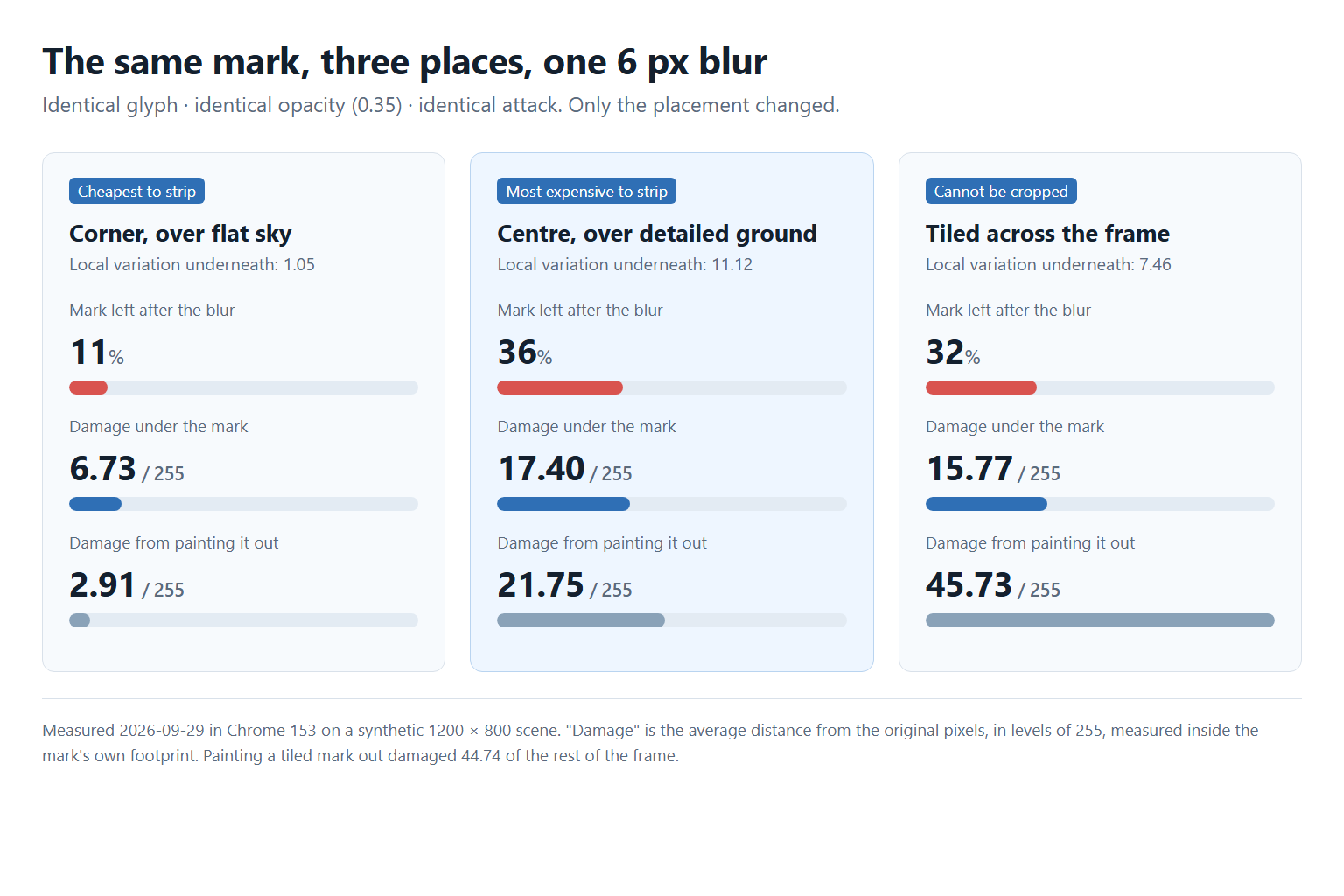
There is a second reading, and it is worth being honest about. Relative to its own surroundings, the sky scar is the worse one: 6.73 of damage against a region that normally varies by 1.05 is a smear 6.4× larger than anything naturally there, while the ground scar (17.40 against 11.12) is only 1.6× the local variation and hides in it. So a mark over flat sky is cheap to remove in absolute terms and leaves the most obviously unnatural patch behind — which is exactly why so many stock previews put their mark in a corner of open sky and why those are the easiest ones to clean up.
Six things a copyist can do, and what each one costs
Each attack was run on the marked image and on an unmarked copy of the same scene, so the damage numbers describe the attack and not the mark.
| Attack | Corner over flat sky | Centre over detail | Tiled over the frame |
|---|---|---|---|
| Paint over with the surrounding average colour | survival 0.00 · damage 2.91 · collateral 0.04 | survival 0.00 · damage 21.75 · collateral 0.17 | survival 0.00 · damage 45.73 · collateral 44.74 |
| Blur 3 px on the mark only | survival 0.16 · damage 7.21 · collateral 0.01 | survival 0.50 · damage 16.98 · collateral 0.10 | survival 0.43 · damage 15.66 · collateral 7.15 |
| Blur 6 px on the mark only | survival 0.11 · damage 6.73 · collateral 0.01 | survival 0.36 · damage 17.40 · collateral 0.11 | survival 0.32 · damage 15.77 · collateral 7.81 |
| Blur 6 px over the whole frame | survival 0.11 · damage 6.73 · collateral 8.71 | survival 0.31 · damage 18.49 · collateral 8.63 | survival 0.25 · damage 16.99 · collateral 8.66 |
| Shrink to 50% and enlarge back | survival 0.62 · damage 7.43 · collateral 6.48 | survival 0.85 · damage 11.28 · collateral 6.41 | survival 0.78 · damage 10.67 · collateral 6.42 |
| Re-encode as JPEG, quality 0.72 | survival 0.97 · damage 5.04 · collateral 9.46 | survival 0.97 · damage 10.65 · collateral 9.40 | survival 0.92 · damage 14.51 · collateral 9.39 |
| Re-encode as JPEG, quality 0.40 | survival 0.94 · damage 6.93 · collateral 10.34 | survival 0.95 · damage 11.97 · collateral 10.27 | survival 0.89 · damage 15.40 · collateral 10.27 |
Three things fall out of that table.
Compression is not removal. The two JPEG rows are the standouts, and not in a good way. Quality 0.40 is a visibly wrecked file — it moved every pixel outside the mark by 10.34 of 255 — and it still left 94% of a corner mark and 95% of one on detailed ground in place. If you have ever hoped that a round trip through a social network would quietly erase a mark, this is why it does not.
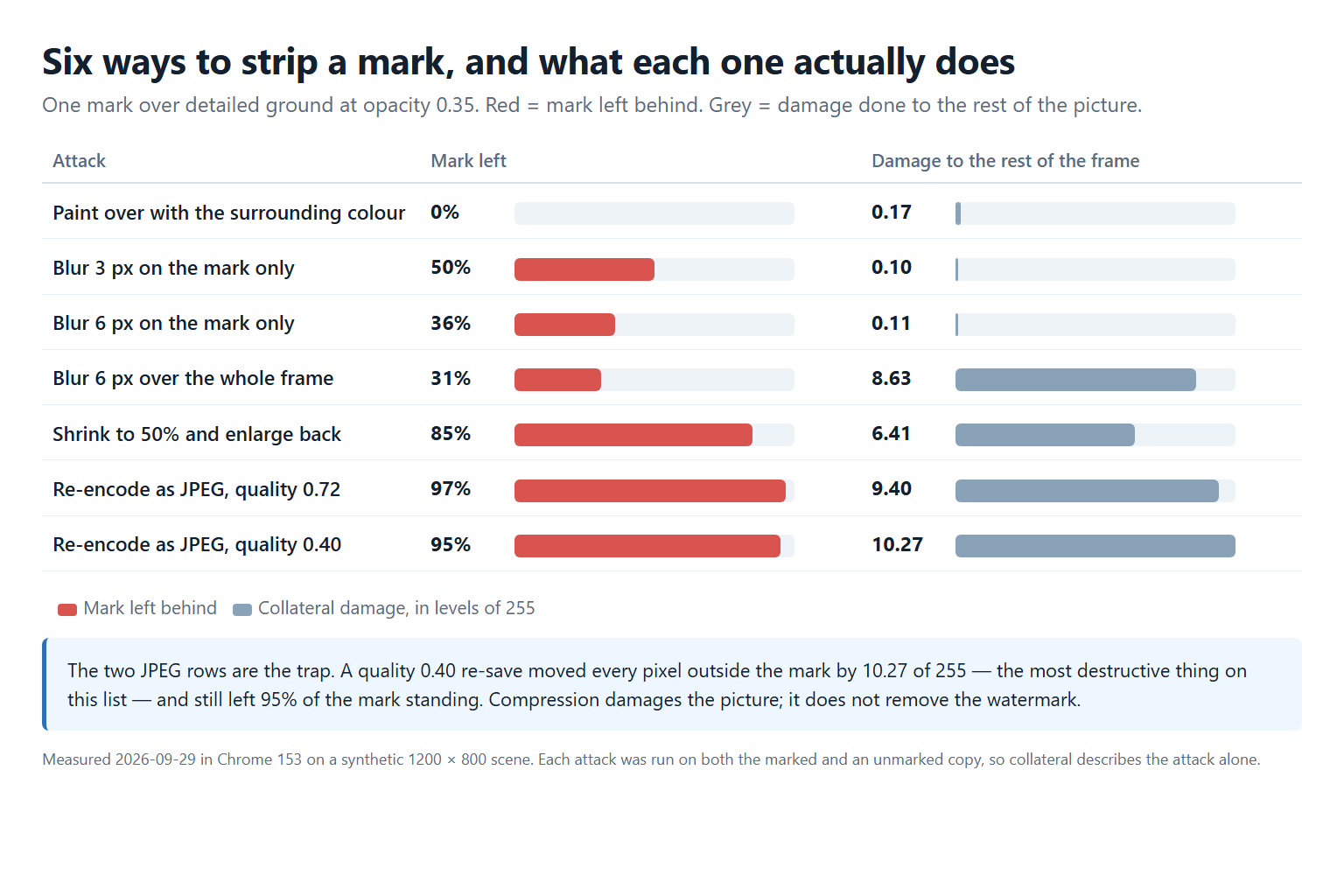
Resizing is not removal either. Halving the image and stretching it back left 62% to 85% of the mark, while costing 6.4 of damage across the entire picture. It is a bigger, blurrier image with the mark still on it.
Targeted edits are almost free — unless the mark is everywhere. Blurring just the corner mark's own box cost 0.01 outside it, which is nothing; the same treatment on a tiled mark cost 7.15 to 7.81 across the frame, because there is no longer anywhere else to work. Painting a tiled mark out entirely damaged 44.74 of the picture — at that point the copyist is not editing a photo, they are rebuilding one.
Opacity raises the price, it does not protect the mark
We redrew the centre mark at four opacities and hit it with the same two attacks. The intuitive hope is that a bolder mark survives better. It does not — but it does make the copyist pay more.
| Opacity | Mark strength | Left after a 6 px blur | Damage under it | Left after JPEG q 0.40 | Collateral from that JPEG |
|---|---|---|---|---|---|
| 0.15 | 15.49 | 38% | 14.11 | 91% | 10.27 |
| 0.35 | 32.52 | 36% | 17.40 | 95% | 10.27 |
| 0.60 | 50.59 | 31% | 23.25 | 97% | 10.27 |
| 0.90 | 71.03 | 24% | 29.96 | 99% | 10.27 |
Six times the opacity (0.15 → 0.90) bought a drop in survival from 38% to 24% — a real but modest gain — and pushed the damage from 14.11 to 29.96 of 255, so the copyist has to destroy 2.1× as much of your picture to get there. Against JPEG it went the other way: the stronger the mark, the more of it survived (91% → 99%), because compression noise is small next to a bold mark and large next to a faint one.
The practical reading: opacity is a price control, not a shield. Turn it up until the mark is as visible as you can tolerate, then spend your remaining effort on placement, because that is where the five-fold differences live.
What actually raises the cost
- Put it over structure, not over open space. Measured above: 7.5× the cost to paint out, and 2.6× the damage under a blur, for the same mark moved from flat sky to detailed ground. If there is a subject, put the mark across a part of it — the classic advice in the design community is to let it overlap a face, precisely because that forces reconstruction rather than erasure.
- Tile it if the image can carry it. A single corner mark is a 1.6% box that can be cropped or edited locally for a collateral cost of 0.009. A tiled mark has no such box: every attack on it costs the whole frame, and painting it out damaged 44.74 of the picture.
- Publish the small version. This is the only lever on this list that nothing on this page can undo. Whatever you do to the file you hand out, keep the full-resolution original private.
- Do not rely on metadata. File metadata does not survive ordinary re-encoding: EXIF, XMP and PNG text blocks are all dropped when a browser re-saves an image, which is measured on the metadata page. A copyright field is not a watermark and a watermark is not a record.
- Keep your own record elsewhere. A watermark is a claim on the surface of the image, and this page shows how cheaply that surface can be altered. Whatever proves the picture is yours has to live outside the picture.
And accept the ceiling. One of the most upvoted answers on this exact question puts it plainly: "A watermark on an image keeps honest people honest, just like a lock on a door. But a watermark (or any other security scheme) will never protect from someone with true larcenous intent." The same answer frames the only question worth asking: "How much value do I place on this image, and how much time and money do I want to spend to make it a little harder (not impossible) for someone to use without my consent?"
What a watermark does not do
- It is not protection. The lowest survival figure we measured was 0.00, achieved by the crudest method on the list. Someone who wants the picture will get a version of it.
- It is not proof. Anything drawn on the surface can be removed from the surface, and anything stored in the file is stripped by re-encoding. Neither is evidence of authorship.
- It is not a licence to edit other people's pictures. The measurements on this page are about your own images. Removing a mark from someone else's work is a different question with legal answers, covered on the legality page.
- It is not free. Every mark you add is a mark someone will try to take off, and the more it damages the picture on the way out, the less use the stolen copy is. That trade, not prevention, is what you are buying.
What nobody in this space writes about
Watermark removal tools talk about removal, and essentially nothing else. On September 29, 2026 we pulled the public HTML of three of them — 337 KB, 137 KB and 199 KB of it — and searched for anyone addressing the reverse question. The word remove appears 564 times on one of those pages and watermark 687 times; the phrases your own watermark, add a watermark and protect your appear zero times across all three. None of the three has any page about adding a mark at all. The one place a watermark's protective role is mentioned, it is mentioned as a reason to take it off: "Watermarks may protect rights, but aesthetically, they interfere with image clarity."
That is the gap this page fills. Every tool in the category is built for the person holding someone else's picture; almost nothing is written for the person who put the mark there. The question itself is not new — it was asked on a public design forum in January 2011 and has been viewed 6,639 times since: "Should I be concerned about someone removing a watermark I add to my image? Are there steps I can take to ensure that it's not possible?" The honest answer to the second half is no. There are only steps that make it more expensive.
Frequently asked questions
Can someone remove the watermark I put on my photo?
Yes. In our measurements the crudest method on the list — painting the region with the average colour around it — removed the mark completely, at a cost of 2.91 of 255 over flat sky and 21.75 over detailed ground. A 6 px blur left 11% of a corner mark and 36% of one placed over detail. Nothing we tried left the mark intact.
Does making the watermark more opaque help?
Not much. Opacity 0.15 to 0.90 moved survival under a 6 px blur only from 38% to 24%, but raised the damage to the picture underneath from 14.11 to 29.96 of 255 — 2.1× more content destroyed. Against JPEG re-encoding the stronger mark actually survived better (91% to 99%), because compression noise is small compared with a bold mark.
Will re-saving, screenshotting or uploading to a social network remove a watermark?
No, and this is the clearest result on the page. A JPEG round trip at quality 0.40 left 89% to 99% of the mark in place while moving every pixel outside it by about 10.3 of 255. It damages the whole picture and removes almost none of the mark. Shrinking to 50% and back left 62% to 85%.
Where is the best place to put a watermark?
Over something with structure. The same mark at the same opacity cost 2.91 of 255 to paint out over a flat sky and 21.75 over detailed ground — 7.5× as much — and a 6 px blur took 89% of it out of the sky version versus 64% of the detailed one. Over a face or any detailed subject is the standard advice for the same reason: it forces reconstruction, not erasure.
Is a tiled watermark actually harder to remove?
It is harder to remove locally. A single corner mark occupies a box covering 1.6% of the frame, so editing it costs 0.009 of 255 everywhere else. A tiled mark's box is the whole frame: blurring it cost 7.15 to 7.81 across the picture, and painting it out damaged 44.74 of it. The trade is that a tiled mark is far more intrusive on your own image.
Is a watermark proof that the image is mine?
No. It is drawn on the surface and can be removed from the surface. Metadata is not a substitute either: EXIF, XMP and PNG text blocks are all dropped when an image is re-encoded in a browser, which is measured on the metadata page. Keep your proof outside the file.
Is it legal to remove a watermark from someone else's image?
That is a separate question with its own boundaries, and it depends on who owns the picture and what you intend to do with it. The measurements here concern marks you placed on your own images. See the legality page.
Can I check whether my own image still has a mark after I have edited it?
Yes, and it costs nothing to do: compare the edited file against your original at 100% zoom, side by side, on the region where the mark was. Numbers like the ones on this page come from exactly that comparison, done pixel by pixel. If you do not have the original, you cannot make the comparison — which is another reason to keep it.
Do online watermark removers upload my picture?
Some do and some do not, and you can check any of them yourself rather than taking their word for it. The verification page shows three methods that work on any site, including watching the browser's own network log while the tool runs.
Scope of these measurements: Chrome 153 headless on Windows, September 29, 2026, on one synthetic 1200 × 800 scene built on a canvas from a fixed random seed, with one text mark (bold 44 px, white fill with a 2 px dark outline) placed three ways at opacities from 0.15 to 0.90. Survival, damage and collateral are computed against the original pixels, as defined above. The scene is synthetic: the flat and detailed regions were built to sit at opposite ends of the texture range, so a real photograph will land between them, not outside, and the absolute damage figures for your image will differ. At opacity 0.60 and above, parts of the mark clip to pure white over the lighter areas of the test scene, which is why some JPEG survival figures reach and marginally exceed 1.00; treat those as "essentially all of it". We did not test a learned inpainting model, we did not test crop-and-reframe (it removes everything in the crop, mark included), and we used one browser version. The competitor observations come from the public HTML of each site as retrieved on the date given and can change without notice. Forum quotations are from a public design Q&A thread and are attributed as quotations.