How the tool behaves
No account, no image history: what happens when you close the tab
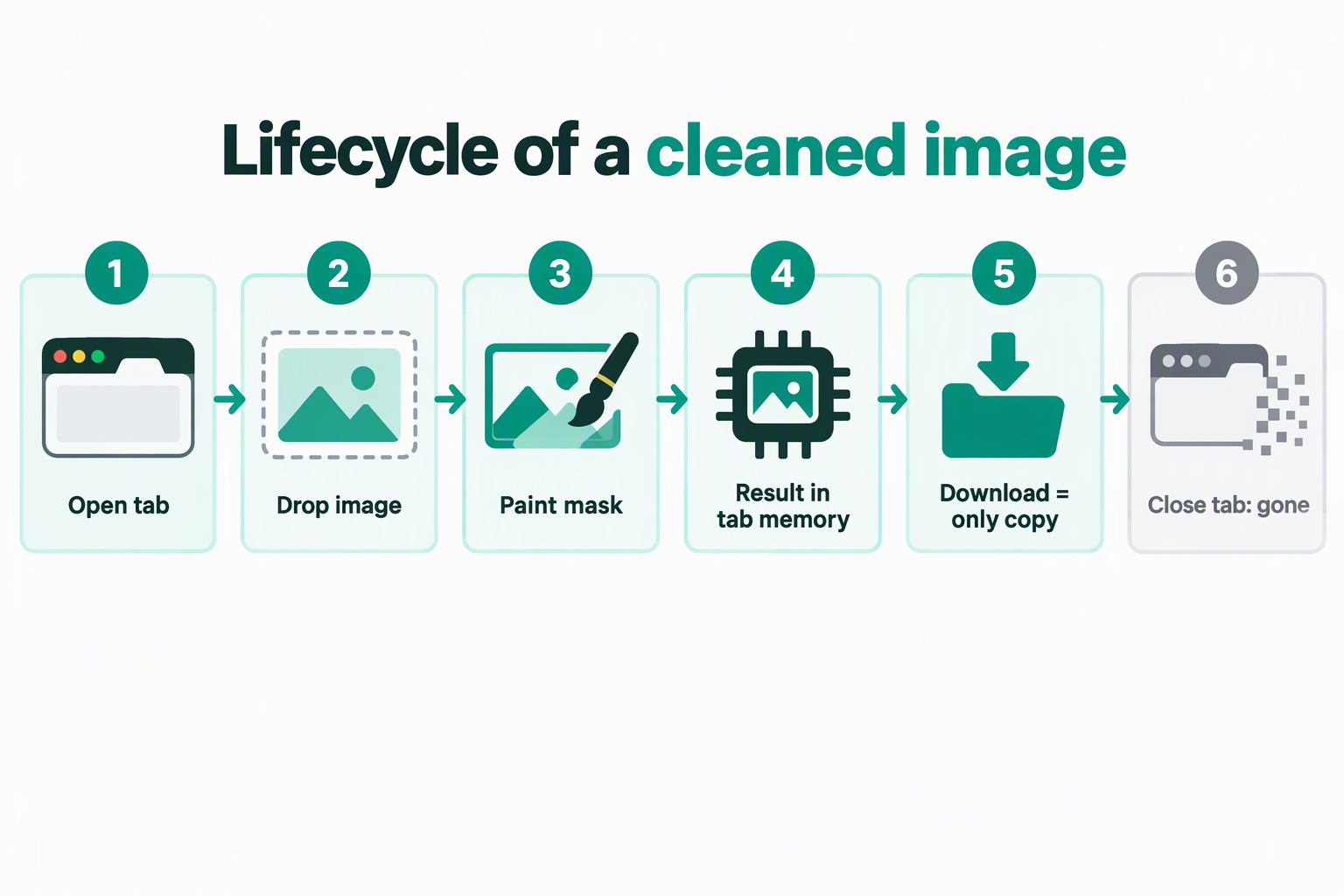
The cleaned image is gone, and there is nothing to recover it from. MarkVanish has no sign-up, no login, no saved project, and no server-side copy of your file: the image, the marks you painted, and the finished result all live in the memory of the one browser tab that produced them. Close that tab, reload it, or open the site fresh and you start from an empty tool. Download before you close, because the download button is the only copy that ever exists.
Measurements below were taken on the live site on September 25, 2026, with Chrome 153 (headless, Windows) driving the real page with real mouse and file input over the DevTools protocol.
What the tab is actually holding
Four things, and all four are ordinary JavaScript objects inside the page:
- The decoded pixels. The image is drawn onto a canvas and read back as raw pixel data. On the home page and the text-removal page, the image is first scaled so its longest side is at most 1800 px; the logo-removal page runs a separate engine whose limit is 2400 px on the longest side.
- The mask you painted. A single byte per pixel marking the area to repair. It is rebuilt from your brush strokes and is discarded after each run.
- The result. The repaired pixels, encoded into a file held in memory.
- The download link. A
blob:URL pointing at that in-memory file. This is what the Download button uses, and it is the single most important detail on this page.
In our run, loading a 1600 × 1067 PNG and repairing one stroke across the middle grew the page's JavaScript heap from 9,736,630 bytes to 25,933,919 bytes — about 15.4 MB held by the tab. That is the entire footprint of your job: some pixels in a tab. Nothing was written to disk, nothing was cached, and nothing was sent anywhere.
The audit, measured rather than asserted
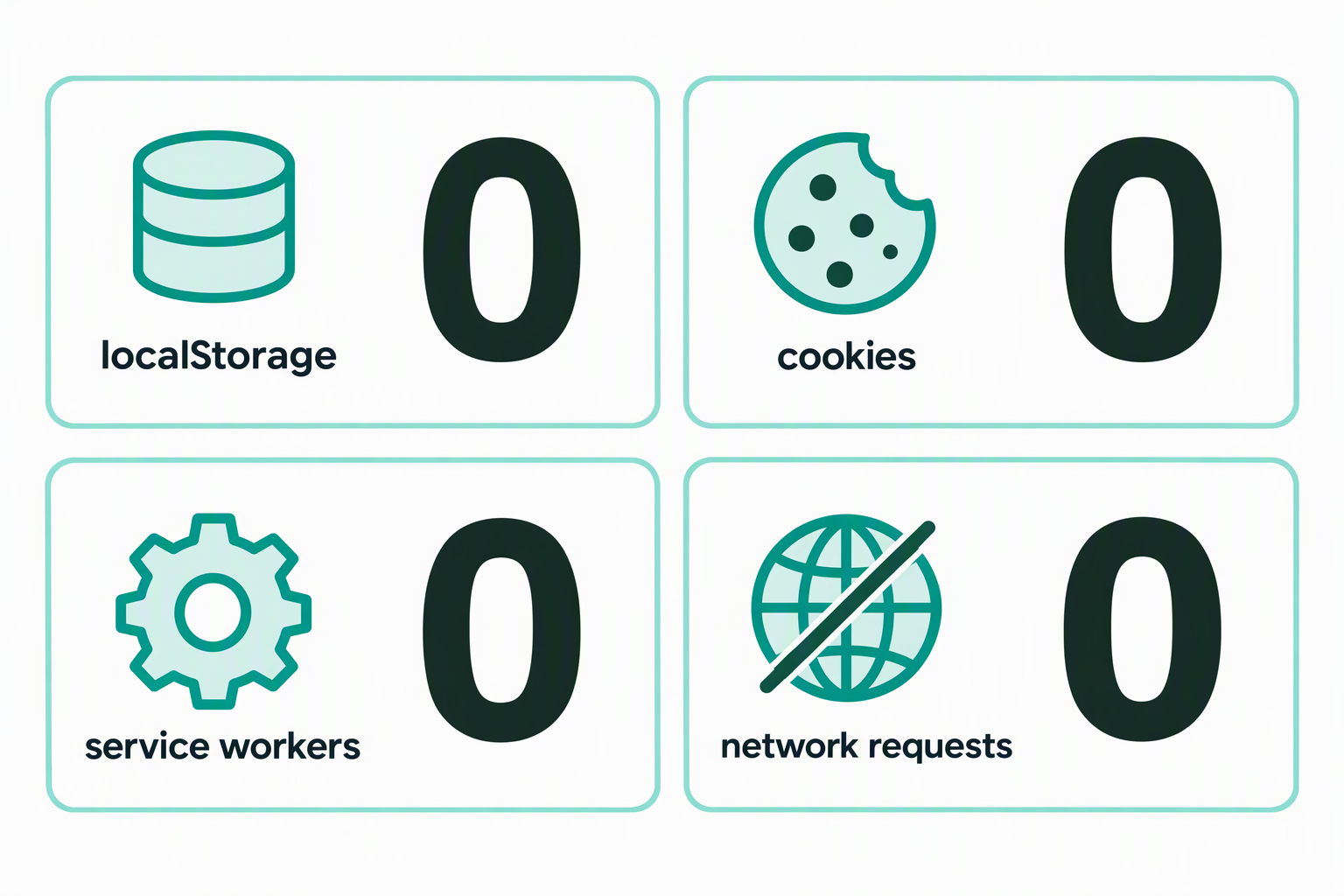
These are counts taken from the live page, not promises. "Before" is the freshly loaded home page; "after run" is the same page with a finished result on screen; "after reload" is the same URL loaded again.
| Checked | Before | After run | After reload |
|---|---|---|---|
| localStorage keys | 0 | 0 | 0 |
| sessionStorage keys | 0 | 0 | 0 |
| IndexedDB databases | 0 | — | 0 |
| Cache API keys | 0 | — | 0 |
| Registered service workers | 0 | — | 0 |
| Cookies for markvanish.com | 0 | 0 | 0 |
| Network requests during processing | — | 0 (three blob: URLs, all local) | — |
| Result file size | — | 2,198,291 bytes (PNG) | 0 — no result |
| Time from clicking Remove to a finished result | — | 592 ms | — |
Two rows deserve a second look. The service worker row is what separates this from an offline-capable app: there is no worker installed, so there is no background process that could hold your image after you leave. And the processing row is the privacy claim in its most testable form: during the repair itself the browser issued no network request at all. The only URLs requested were blob: URLs created inside the page.
The page does load four resources on arrival, none of which is your image: the stylesheet, the tool script, the favicon, and Cloudflare's measurement beacon (beacon.min.js from static.cloudflareinsights.com plus one request to /cdn-cgi/rum). In our run that beacon set no cookies — the cookie jar for the domain was empty before, during, and after the job. The privacy page states the same position in policy terms: MarkVanish does not set its own analytics or advertising cookies and does not use browser storage to save images, while Cloudflare may use essential technologies for security and delivery.
Exactly when the result disappears
The result is a blob: URL owned by the document that created it. While that document lives, the link resolves. When the document is torn down, the link stops resolving — and a browser's specification requires the blob URL entry to be removed when its creator goes away. We tested both halves of that rule rather than assuming it.
- Reload the page: gone. After a reload the tool was back to its empty state (editor hidden, download disabled, status "Ready when you are"), every storage API still read empty, and fetching the previous result's URL failed with
TypeError: Failed to fetch. - Close the tab: gone. We finished a job, confirmed from a second tab that the link still returned the full 2,198,275-byte file, then closed the first tab. The identical request from the second tab then failed with
TypeError: Failed to fetch. Closing the tab destroys the file as completely as a reload does. - Crash, force-quit, or OS restart: gone. Same mechanism. Nothing was written to disk at any point, so there is no file to find afterwards.
- Back button: it may come back. Leaving for another page and pressing Back returned the finished result still on screen, with the link resolving to 2,198,275 bytes. That is your browser restoring the page from memory, not a feature of this site. It is unreliable, it does not survive a restart, and you should not plan around it.
One detail surprises people who test this themselves: while the original tab is open, the same result link also resolves in a different tab of the same browser. That is normal behaviour for blob URLs of the same origin, and it does not mean the file is stored anywhere — the moment the creating tab closes, the link dies in both.
Why no history is also the protection
The absence of an account is not a missing feature you should expect to arrive later. It is the reason several common risks do not exist here.
- There is no account to breach. A stolen password database cannot contain you, because there is no row for you.
- There is no retention period to worry about. Questions like "how long do you keep my uploads" have no answer because there is nothing kept. Compare that with a service that stores files for 24 hours for a download link: your private photograph sits on someone else's disk for a day.
- There is no deletion request to file. Nothing to delete means nothing to ask for, and nothing for a support agent to recover by mistake.
- There is no cross-device copy. A confidential screenshot opened here does not appear on a phone, a work laptop, or a colleague's account later.
The trade is straightforward: you give up recovery and you get privacy. If you want to check the privacy half yourself instead of taking our word, the verification method shows how to watch a tool's network traffic and see where the image goes.
What it costs you
Stated plainly, because this is the part that annoys people who lose a result:
- No recovery after the fact. There is no history list, no "recent images" panel, and no way for anyone to restore a result you did not download.
- No re-download. Once the tab is gone, the only way to get that file again is to run the job again: pick the same image from disk, repaint the same area, and press Remove. In our run the processing step alone took 592 ms, so the redo cost is mostly your own time, not waiting.
- One image at a time. Each page handles a single file. There is no queue and no folder mode.
- A fixed download name. The home and text-removal tools save as
watermark-removed.png; the logo-removal tool names the file after the format you chose, for examplelogo-removed.jpg. Rename the file after saving if you need something specific. - No warning on exit. The page does not intercept closing, so there is no "you have unsaved work" prompt. Nothing will stop you from closing a finished result.
How to never lose a result
- Download immediately. The moment the status reads done, press Download. Treat the on-screen preview as a preview, not as a saved file.
- Check the file before you close the tab. Open the downloaded file once. If it is not what you wanted, the job is still in memory and you can undo and run again.
- Pick your output format deliberately if you are on the logo page. PNG, JPEG, and WebP are not interchangeable. See which output format to choose before you commit, because transparency behaves differently between them.
- Work in one sitting per image. With no saved state, a long interruption usually means restarting.
- For a set of images, do them one at a time and download each one. There is no batch mode to fall back on.
Frequently asked questions
Do I need to create an account to use it?
No. There is no sign-up, no login, and no email capture anywhere on the tool pages. You open the page, choose an image, and the Download button is the only thing that produces a file.
Is my image saved anywhere on the site?
No. Measured on the live page, a completed job left localStorage, sessionStorage, IndexedDB, and the Cache API all empty, with no service worker installed and no cookies set. The repair issued zero network requests.
What exactly happens when I close the tab?
The document that owns the result is destroyed, and with it the in-memory file behind the Download button. We confirmed this by finishing a job, verifying from a second tab that the link still returned 2,198,275 bytes, closing the first tab, and watching the same request fail with TypeError: Failed to fetch.
Can I come back later and download it again?
No. Reloading the page returns the tool to its empty state with the download button disabled. There is no history to browse and no session to resume.
Does the Back button bring my result back?
Sometimes. In our test, leaving the page and pressing Back returned the finished result with its link still resolving. That is your browser's own restore behaviour, not a feature of this site; it does not survive a browser restart and should not be relied on.
Why not just add an account and save my work?
Saving work server-side means uploading the image, which is the thing this site is built to avoid. The moment a history feature exists, your images have to live somewhere that is not your machine, and they need a retention policy, access controls, and a deletion process.
What file name does the download use?
The home and text-removal tools save as watermark-removed.png. The logo-removal tool names the file after the selected format, for example logo-removed.jpg or logo-removed.webp.
Does the site use cookies or analytics?
Measured: no cookies were set for markvanish.com at any point in a full job. The page does load Cloudflare's measurement beacon — one script from static.cloudflareinsights.com and one request to /cdn-cgi/rum — for aggregate traffic measurement. There is no advertising code on the tool pages.
Can I process several images at once?
No. Each page handles one image and holds no queue. Run them one at a time and download each result before moving to the next.
What happens if my browser crashes mid-job?
The same as closing the tab: nothing persists, because nothing was written to disk. Reopen the page and start again.
Figures on this page come from instrumenting the live home page in Chrome 153 on September 25, 2026, using a 1600 × 1067 PNG and a single repair stroke. Behaviour of the Back button and of blob URL lifetime depends on your browser; the numbers describe that test, not a guarantee on every device.