Tool boundaries
An image watermark remover cannot remove a watermark from a video
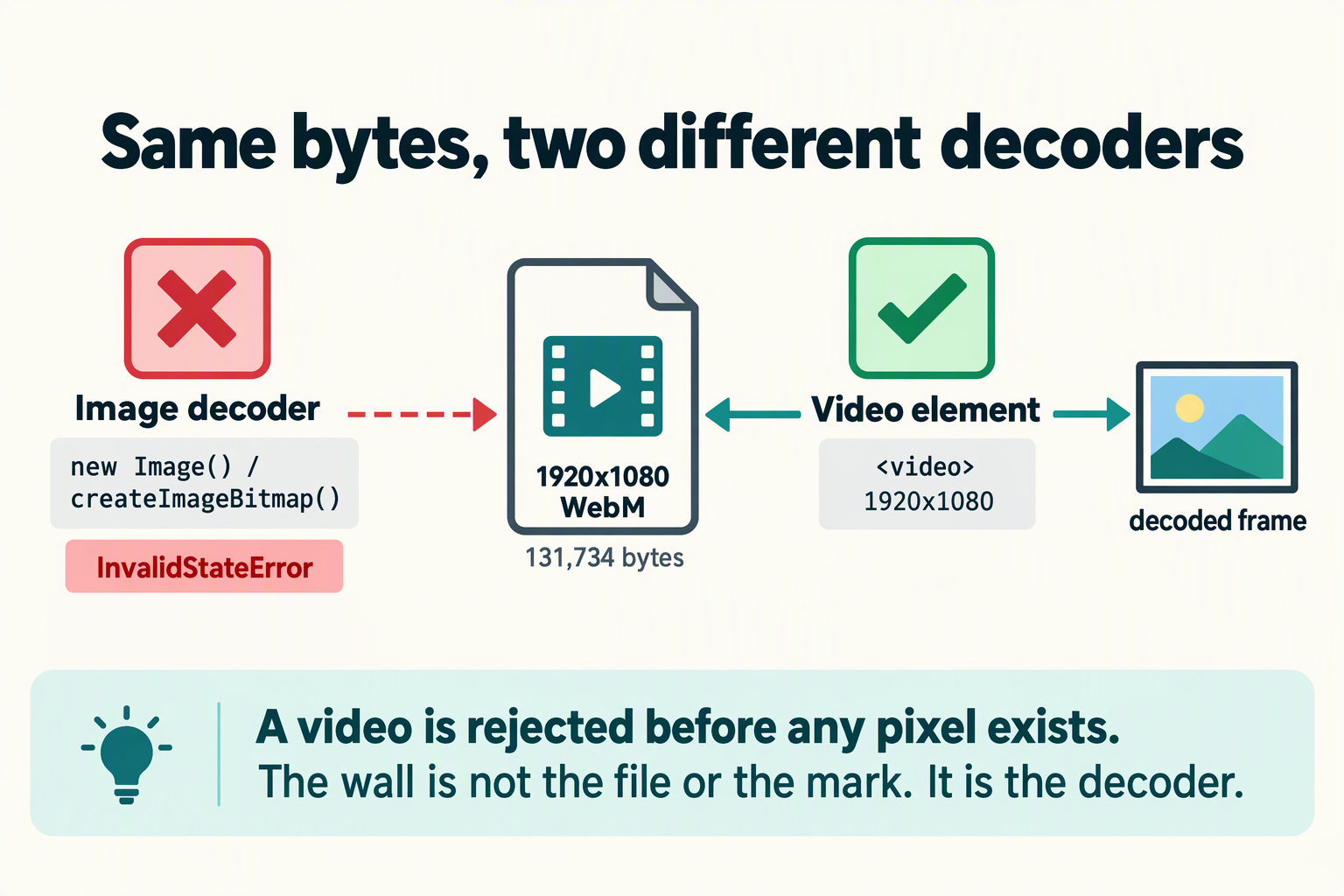
No, and this is a boundary rather than a missing feature. A still-image tool decodes one picture, lets you mark one region, and writes one file back. A video is a container holding a decoder an image pipeline does not have, plus thousands of pictures that each need their own region marked. We recorded a real 1920 × 1080 video inside Chrome and fed it to the same decode path an image tool uses: the browser refused it with InvalidStateError: The source image could not be decoded. Below is exactly where the boundary sits, what the numbers look like when you try to cross it one frame at a time, and which class of tool actually does this job.
Measurements on this page were taken in Chrome (headless, Windows) on September 27, 2026. The ffmpeg behaviour is quoted from the FFmpeg Filters documentation, section 11.63, delogo.
Image and video are different units of work
The two are often treated as one problem because the visible mark looks the same on screen. Underneath, almost nothing is shared:
| A single image | A video file | |
|---|---|---|
| What gets decoded | One frame of pixels | A container plus a compressed stream, decoded frame by frame in time order |
| How many regions you mark | One | One per frame, because the picture behind the mark keeps changing |
| What "the output" is | One file | The frames reassembled and re-encoded, with audio and timing preserved |
| What breaks it | The mark sitting on a textured or detailed area | All of the image problems, plus frame-to-frame consistency: a fill that differs slightly each frame reads as flicker |
| Which tool does it | A browser still-image editor | A video filter or an editor with masking and tracking |
That last row is the practical answer. The job is not "remove a watermark from a picture" repeated many times; it is "reconstruct a moving region consistently across time", which is a different problem with different tooling.
Where exactly the boundary is, measured
To avoid arguing from theory, we produced a genuine video file inside the browser — a 1920 × 1080 WebM recorded with MediaRecorder from a canvas stream, 131,734 bytes — and then offered that exact file to the two entry points a still-image pipeline uses. The same file was then opened the way a video tool has to open it.
| How the file was opened | Result |
|---|---|
new Image() with the video as its source | Failed. The error event fired and the element reported naturalWidth 0, naturalHeight 0. Nothing decoded. |
createImageBitmap(<video blob>) | Failed. InvalidStateError: The source image could not be decoded. |
A <video> element with the same file | Opened normally and reported 1920 × 1080. |
So the wall is not the file, and it is not the pixels. It is the decoder. A still-image pipeline asks the browser's image decoder for pixels; that decoder accepts still formats and rejects a video container outright, before any pixel exists to work on. The same bytes open fine one line later through the video element, because that path uses a different decoder.
The site's own inputs declare the same boundary in their markup. All three file pickers accept image MIME types only:
- Home and remove text from image:
image/jpeg, image/png, image/webp, image/heic, image/heif - Remove logo from image: the same list plus
image/bmpandimage/avif
No video type appears in any of them. The logo page also states it plainly in its FAQ: it is a single-image editor, and video, PDF and batch work are outside its scope. That is a deliberate limit, not an oversight.
What happens if you try anyway, one frame at a time
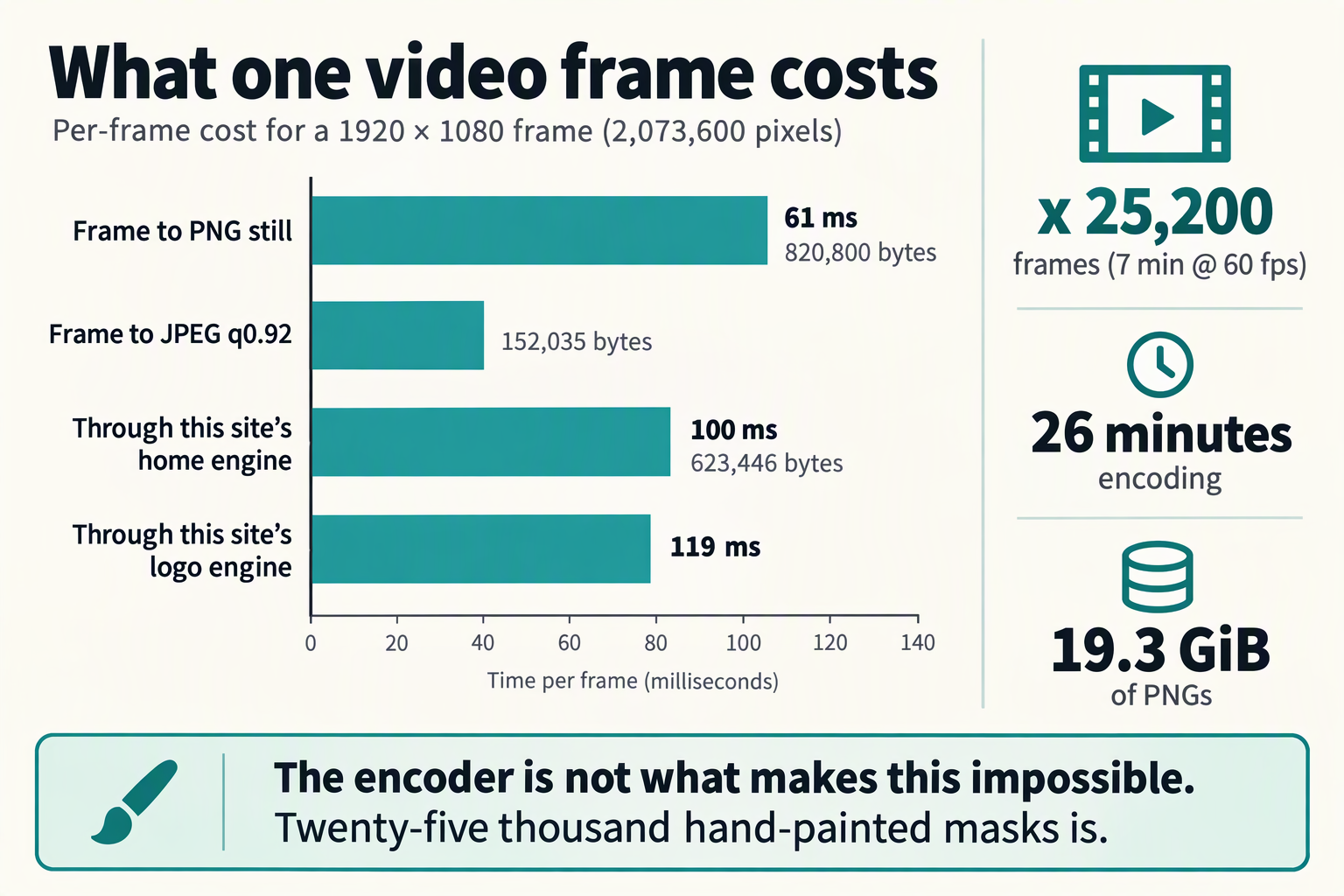
Suppose you export the frames as stills and run them through an image tool. The scale of that is worth putting in numbers, so take a real request rather than a hypothetical one. A user on Graphic Design Stack Exchange asked how to remove a static logo over a moving background, having already tried After Effects' content-aware fill without success, and described the job as: "My video lasts 7 minutes with 60 frames / second, so you can imagine that I cannot do that frame by frame." Seven minutes at 60 fps is 25,200 frames.
| Step | Measured per frame | Across 25,200 frames |
|---|---|---|
| Video frame → canvas → PNG still | 61 ms median (min 44, max 232); 820,800 bytes | about 26 minutes, 19.3 GiB of PNGs |
| Same frame as JPEG, quality 0.92 | 152,035 bytes | 3,654 MiB of JPEGs |
| Raw pixels held in memory | 8,294,400 bytes (1920 × 1080 × 4) | one frame at a time, never all of it |
| Through this site's home or text engine | 100 ms median, 1920 × 1080 in → 1800 × 1013 out, 623,446 bytes | about 42 minutes |
| Through this site's logo engine | 119 ms median for a 3840 × 2160 input → 2400 × 1350 out | about 50 minutes |
Read those machine numbers with the right weight. Twenty-six minutes of straight encoding is not what makes this impossible. Two other things are:
- The mask is painted by hand, every frame. On this site you brush the region yourself. Twenty-five thousand two hundred hand-painted masks is the real cost, and no amount of encoding speed removes it.
- The frames have to go back together. An image tool outputs stills. Reassembling them with the original audio, frame rate and timing is a separate encoding job that no still-image editor performs.
The quality cost nobody mentions: the frames come back smaller
Even if you did the work, the stills would not come back at the resolution you pulled them out at. Both engines on this site scale an image down when it exceeds a cap, and video resolutions sit above those caps:
| Page | Longest-edge cap | 1080p frame in → out | 4K frame in → out |
|---|---|---|---|
| Home and remove text from image (shared engine) | 1800 px | 1920 × 1080 → 1800 × 1013 | 3840 × 2160 → 1800 × 1013 |
| Remove logo from image (its own engine) | 2400 px | 1920 × 1080 → unchanged | 3840 × 2160 → 2400 × 1350 |
The consequence is arithmetic on the measured dimensions. A 1080p frame run through the home or text engine keeps 87.9 percent of its pixels, so putting it back on a 1920 × 1080 timeline means upscaling by 1.07×. A 4K frame run through that same engine keeps 22.0 percent of its pixels and needs 2.13× upscaling; through the logo engine it keeps 39.1 percent and needs 1.6×. You would be softening the whole picture to clean one corner of it, and the loss lands on every frame equally.
Note also that the home and text pages publish no number for this. The cap is a behaviour of the code, visible when you check the output's dimensions, not a figure written on the page.
Why a static logo over a moving background is its own problem
The case in that Stack Exchange question is the hardest common one: the mark does not move, but everything behind it does. A reconstruction fills the marked region from its surroundings, so the fill is computed from different content on every frame. Do that well enough on each individual frame and the patch still does not match from one frame to the next, which the eye reads immediately as a shimmering or crawling rectangle.
The tool built for exactly this job is refreshingly blunt about what it does. The FFmpeg documentation describes delogo as follows: "Suppress a TV station logo by a simple interpolation of the surrounding pixels. Just set a rectangle covering the logo and watch it disappear (and sometimes something even uglier appear - your mileage may vary)." It requires x, y, w and h — the top-left corner and the size of the logo — and the documentation notes that "the values of the next pixels immediately outside this rectangle in each direction will be used to compute the interpolated pixel values inside the rectangle". Setting show=1 draws a green rectangle over the affected area, which is how you find the right numbers. The documented example is delogo=x=0:y=0:w=100:h=77.
That description is worth internalising, because it is the same family of method as a brush-and-repair tool: interpolate from the surroundings. The difference is that a video filter applies the identical rectangle to every frame automatically, which is exactly what keeps the result stable across time — and it operates on the video directly, so no resolution downscale is imposed by a still-image cap.
What to use instead
- For a logo in a fixed corner, use a video filter. FFmpeg's
delogois the direct answer for a station-style bug. Find the rectangle withshow=1, then apply it to the whole file in one pass. Expect a simple interpolation, not a reconstruction, and judge it on a moving shot rather than a paused frame. - For anything more complex, use an editor with masking and tracking. When the mark moves, or the background behind it is detailed, a tracked mask that follows the region and a fill evaluated over time will beat any per-frame still workflow. This is the route a motion-graphics editor is built for.
- If the mark is near the edge, consider reframing. Cropping and blurring are not elegant, but they are consistent across every frame by construction, and they never introduce a patch that flickers.
- Check the rights before you check the tools. A platform's own bug, a broadcaster's overlay and a photographer's mark are three different situations. The boundary is set out on is it legal to remove a watermark, and platform terms may restrict this regardless of what the tool allows.
- If the mark is in a still, not a video, come back here. Single images are what this site does: pick the home tool or the text or logo page, and the format page tells you what will open.
What this site does and does not do
- It does remove a visible mark from one still image at a time, in your browser, with no upload and no account.
- It does not open video files of any kind. Not MP4, MOV, WebM, AVI or MKV: the file pickers accept image MIME types only, and the browser's still-image decoder rejects a video container before any pixel is read.
- It does not extract frames, reassemble them, or preserve audio and timing, because it never sees a timeline.
- It does not do batch work. Even a folder of stills has to go through one image at a time.
- Everything stays local. The verification page gives the method to confirm that with your own network panel, and the no-signup page explains what that costs you in convenience.
Frequently asked questions
Can I remove a watermark from a video with an image watermark remover?
No. A still-image tool decodes one picture; a video file is rejected by the browser's image decoder before any pixel is read. In our Chrome test, handing a real 1920 × 1080 video to that decoder produced InvalidStateError: The source image could not be decoded.
What actually happens if I drop a video file onto the tool?
Nothing useful. The file pickers on every page of this site accept image MIME types only, so a video is not offered in the dialog in the first place. If it is forced through, the decode fails rather than producing a frame.
Couldn't I just export the frames and clean them one by one?
You could, and the numbers show why nobody finishes. Seven minutes at 60 fps is 25,200 frames. Encoding alone measured 61 ms per frame, about 26 minutes total, and produced 19.3 GiB of PNG stills. The real blocker is that the region has to be marked by hand on every single frame, and the frames then have to be reassembled with audio and timing intact.
Why does cleaning each frame separately cause flicker?
Because the fill is computed from each frame's own surroundings. When the background behind a static logo keeps moving, every frame gets a slightly different reconstruction, and the difference between consecutive frames is visible as a shimmering patch. A video filter avoids this by applying one identical rectangle and one identical operation to every frame.
What is the right tool for a logo in the corner of a video?
A video filter. FFmpeg's delogo takes a rectangle covering the logo (x, y, w, h, all required) and interpolates that region from the pixels immediately outside it. Its own documentation warns that results vary, so check it on a moving shot.
Does this site shrink video frames if I did export them?
Yes, if they exceed the cap for the page you use. Measured: a 1920 × 1080 frame comes back as 1800 × 1013 from the home and text pages, and unchanged from the logo page. A 3840 × 2160 frame comes back as 1800 × 1013 from the home and text pages and 2400 × 1350 from the logo page.
Do you support batch processing?
No. Every page here is a single-image editor by design. Batch and folder processing are outside its scope.
Is removing a watermark from a video legal?
It depends on whose mark it is, what licence you hold and what you do with the result, and platform terms can restrict it independently of copyright. That is covered separately on the legal boundary page.
Does my file get uploaded when I use this site?
No. Processing happens in your browser. The verification page shows how to confirm that yourself.
Figures come from a Chrome headless run on Windows on September 27, 2026. The test video was a real 1920 × 1080 WebM (131,734 bytes) recorded in the browser with MediaRecorder and canvas.captureStream(); per-frame costs are medians of 12 to 15 runs. The frame-count example is taken from a public question on Graphic Design Stack Exchange describing a seven-minute, 60 fps clip. The delogo description and parameters are quoted from the FFmpeg Filters documentation, section 11.63. Video tooling changes quickly; check your own tool's documentation for current capability.