Tool boundaries
An image watermark remover cannot open a PDF
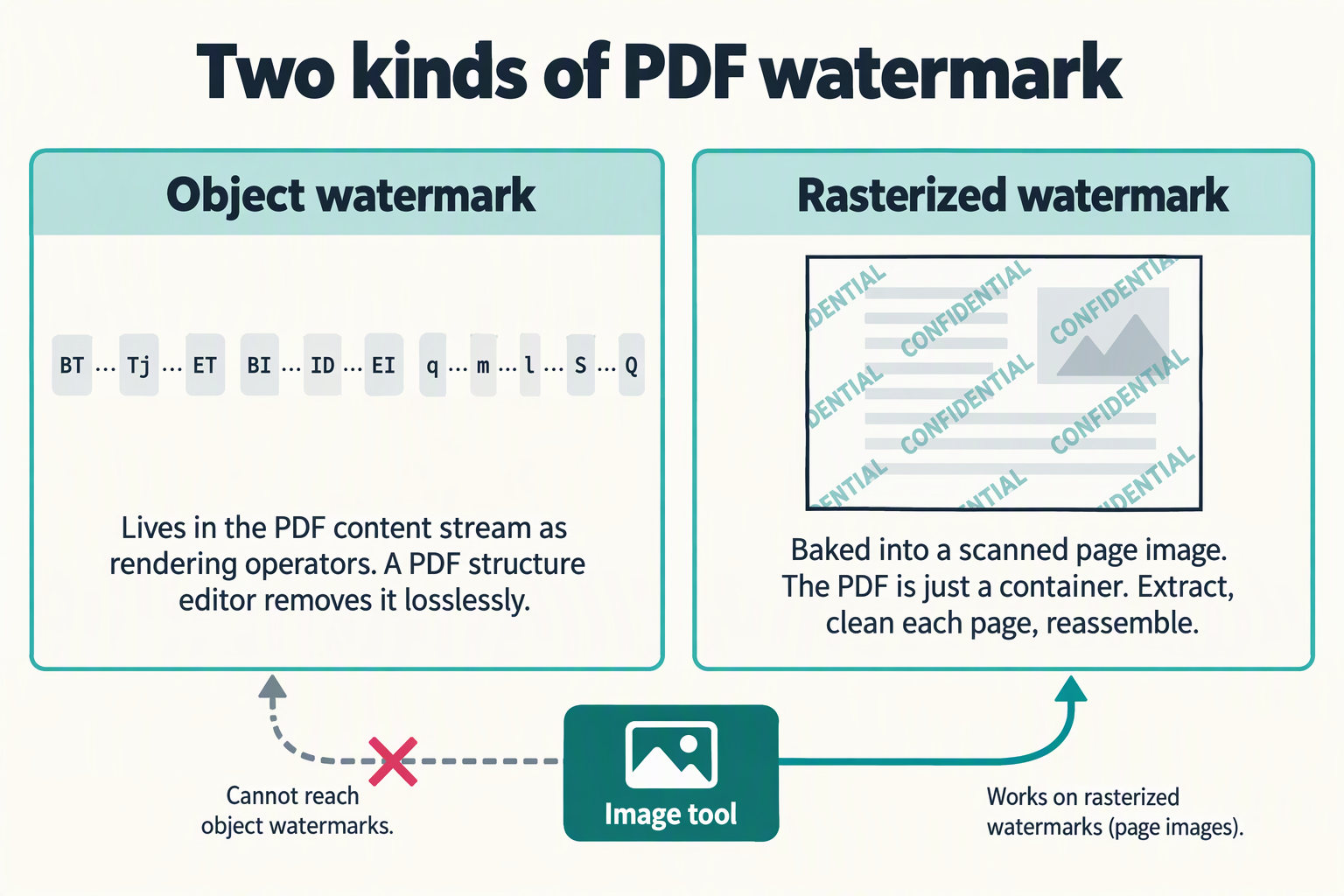
No, and the reason is the same wall as video: the browser's image decoder rejects the file before any pixel exists. But a "PDF watermark" is a more useful question to split, because it has two genuinely different answers. One kind is an object in the page description — a text string, an image, or a vector drawing — and a PDF structure editor can find and remove it without touching a single pixel. The other kind is a mark baked into a rasterized page scan, where the PDF is just a container and the problem really is an image problem — but you still cannot hand the PDF to an image tool; you have to extract the images first. A user on Super User identified that split exactly when they described their scanned PDF and wrote: "Since the pdf is made of image files there is no watermark object to be manipulated directly, so this is an image processing problem." Below is where each boundary sits, what the PDF content stream actually looks like, and which class of tool handles each case.
Measurements on this page were taken in Chrome (headless, Windows) on September 27, 2026. The PDF content streams were built by hand following the operator syntax in the ISO 32000-2 / Adobe PDF Reference and verified by feeding them to Chrome's image decoder.
A PDF is a page description, not a picture
The two are often treated as one problem because the watermark looks the same on screen. Underneath, almost nothing is shared:
| A single image | A PDF file | |
|---|---|---|
| What the file is | A grid of decoded pixels | A sequence of operators in a content stream that a renderer interprets to produce a page |
| Where the watermark lives | In the pixels themselves | As a text, image, or vector object referenced by operators in the content stream — or, in scanned PDFs, baked into a raster image the page wraps |
| How you remove it | Paint over the marked pixels with surrounding fill | Edit the content stream to delete the operator, or extract the raster images, clean each one, and reassemble |
| What tool does it | A browser still-image editor | A PDF structure editor for object watermarks; a multi-step extract-clean-reassemble pipeline for rasterized watermarks |
That last row is the practical answer. The job is not "remove a watermark from a picture" with a different file extension; it is "edit a document structure" or "pull images out of a container and put them back", and neither is what a brush-and-fill image tool does.
Where exactly the boundary is, measured
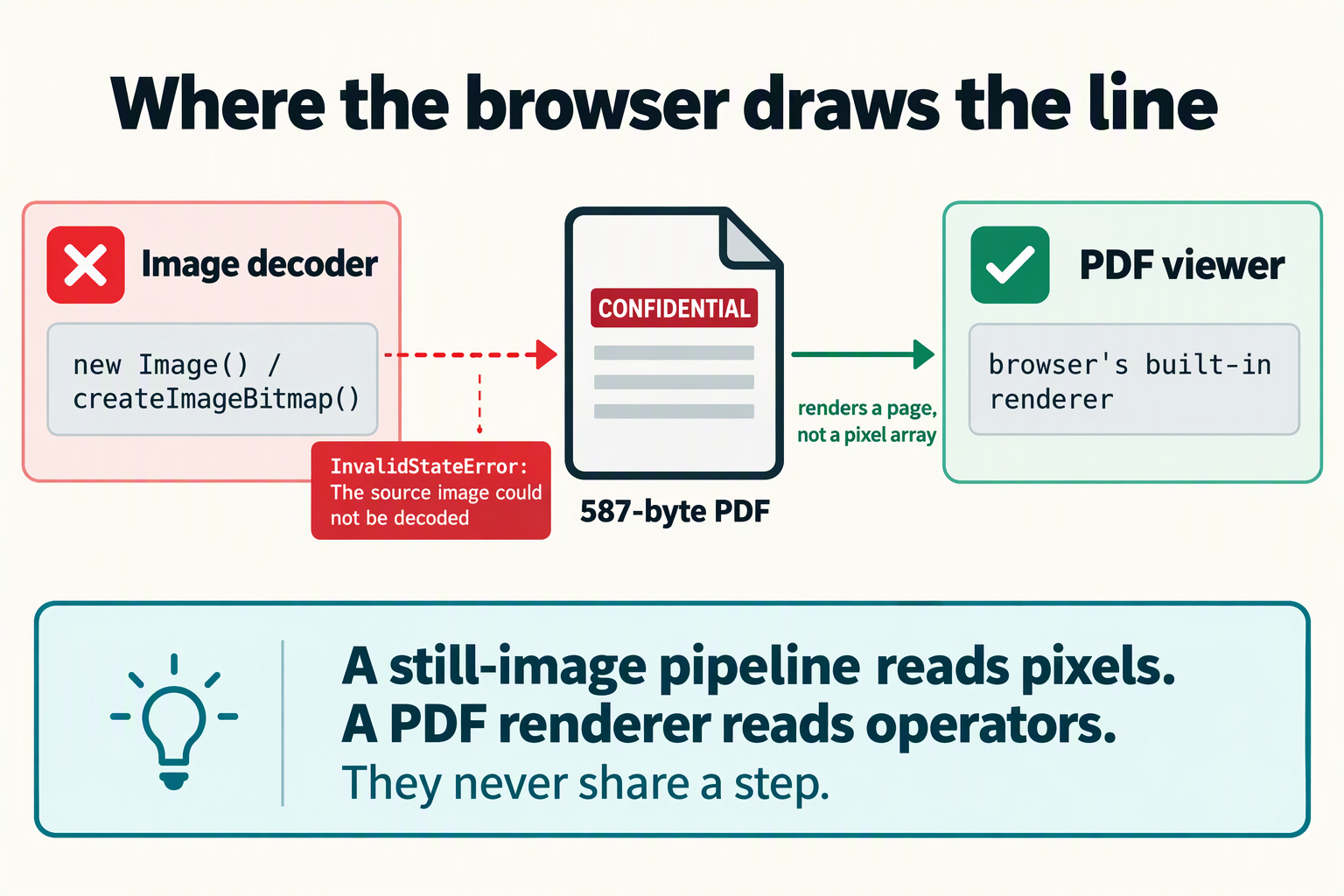
To avoid arguing from theory, we built a real, valid PDF by hand — a single A4 page with a 48-point text watermark reading CONFIDENTIAL, 587 bytes — and then offered those exact bytes to the two entry points a still-image pipeline uses. A PNG was run through the same path as a sanity check.
| How the file was opened | Result |
|---|---|
new Image() with the PDF as its source | Failed. The error event fired and the element reported naturalWidth 0, naturalHeight 0. Nothing decoded. |
createImageBitmap(<pdf blob>) | Failed. InvalidStateError: The source image could not be decoded. |
new Image() with a real PNG as source (sanity check) | Worked. naturalWidth 100, naturalHeight 100. |
So the wall is the same one as video, and it is not the file or the visible mark. It is the decoder. A still-image pipeline asks the browser's image decoder for pixels; that decoder accepts still raster formats and rejects a PDF outright, before any pixel exists to work on. The same browser can render the PDF fine through its built-in PDF viewer, because that path uses a completely different renderer — but that renderer produces a page, not a pixel array that a brush tool can operate on.
The site's own inputs declare the same boundary in their markup. All three file pickers accept image MIME types only:
- Home and remove text from image:
image/jpeg, image/png, image/webp, image/heic, image/heif - Remove logo from image: the same list plus
image/bmpandimage/avif
No application/pdf appears in any of them. The file picker dialog will not even offer PDFs in the first place.
Three kinds of PDF watermark, in the operators that make them
The reason a PDF watermark is not an image watermark is visible in the file's own content stream. A PDF page is described by a sequence of operators that a renderer interprets. The watermark — if it is a PDF object, not a baked-in raster — is one of three kinds, each made of different operators:
| Kind | Content stream (verbatim) | What the operators do |
|---|---|---|
| Text watermark | BT /F1 48 Tf 80 400 Td (CONFIDENTIAL) Tj ET |
BT begins a text object. /F1 48 Tf selects font F1 at 48 point. 80 400 Td moves the pen to position (80, 400). (CONFIDENTIAL) Tj draws the string. ET ends the text object. Removing this watermark means deleting the line; nothing in the result changes. |
| Inline image watermark | BI /W 4 /H 4 /BPC 8 /CS /RGB ID <bytes> EI |
BI begins an inline image. /W /H /BPC /CS set width, height, bits-per-component, and colour space. ID introduces the raw pixel data. EI ends it. The image is embedded directly in the content stream, not stored as a separate object. |
| Vector watermark | q 2 w 100 100 m 512 692 l S Q |
q saves the graphics state. 2 w sets line width to 2. 100 100 m moves to (100, 100). 512 692 l draws a line to (512, 692). S strokes the path. Q restores the state. The watermark is a drawn path, not pixels or text. |
None of those are pixels. They are instructions. A renderer reads them and draws a page, but the instructions themselves are the watermark. Remove the instruction and the watermark is gone, with zero quality loss, because no pixel was ever painted over. That is a fundamentally different operation from what an image watermark remover does — which fills a pixel region with surrounding texture and always degrades the area to some degree.
A fourth variant exists: an image stored as an external XObject and placed with the Do operator. The watermark is a full raster image living in its own object, and the content stream just says "draw object 6 here". Removing it means deleting the Do call and optionally the XObject itself. Again, no pixel work is involved.
The PDF-of-images case: when it really is an image problem
There is a second kind of PDF watermark, and it is the one that confuses the boundary. When a PDF is made from scanned pages, each page is a single raster image — a JPEG or TIFF wrapped in a PDF page object. If the original paper had a watermark, that watermark is baked into the pixels of the scan. There is no text operator to delete, no vector path to remove, no XObject to unlink. The watermark is in the image, and the PDF is just a container.
This is exactly the situation a user described on Super User. Their question, titled "Remove watermark from pdf of images", reads: "I have a pdf consisting of page scans and they have an annoying watermark that appears as a grey image in the middle of pages difficulting reading. Since the pdf is made of image files there is no watermark object to be manipulated directly, so this is an image processing problem."
That last sentence is the crux, and the user got it exactly right. When the watermark is in the rasterized scan, the only way to remove it is to extract each page's image, run it through an image processing tool, and put it back. But even here, an image watermark remover is only the middle step of three:
- Extract the images from the PDF. This is a PDF operation, not an image operation. Tools like
pdfimages(part of Poppler) orpdftoppmpull each page's raster out as a separate file. The image tool has no part in this step. - Clean each extracted image. This is the one step an image watermark remover can do — one page at a time, by hand, with the region brushed on each scan.
- Reassemble the cleaned images into a new PDF. This is another PDF operation. Tools like
img2pdforreportlabwrap each image back into a PDF page, preserving page order and size. The image tool has no part in this step either.
So even in the case where the problem genuinely is an image problem, the image tool cannot open the PDF, cannot extract the pages, and cannot produce a new PDF. It is the middle of a three-step pipeline, not the whole solution.
What each kind of watermark actually needs
| Kind of watermark | How to tell | What removes it | Quality cost |
|---|---|---|---|
| Object watermark (text, image XObject, or vector in the content stream) | Open the PDF in a structure-aware tool and inspect the content stream. The watermark appears as an operator, not as pixels. | A PDF structure editor: qpdf (free, command-line), cpdf (command-line), pikepdf (Python library), or Acrobat (commercial). These find and remove the operator from the content stream directly. |
Zero. No pixel is touched. The surrounding content is byte-for-byte identical after removal. |
| Rasterized watermark (baked into scanned page images) | The PDF's pages are single raster images. No text operators exist. The watermark is visible in the pixel data of the scan. | Extract images (pdfimages / pdftoppm), clean each one with an image tool, reassemble (img2pdf / reportlab). Three tools, not one. |
The same quality cost as any image watermark removal: the filled area is reconstructed from surrounding texture and never matches the original perfectly. |
The practical test is simple: if you can select the watermark text in a PDF viewer, it is an object watermark and a structure tool will remove it losslessly. If you cannot select it — if it is just pixels on a scanned page — it is a rasterized watermark and needs the extract-clean-reassemble pipeline. No image tool can do either job on its own, because neither job starts with "open a PDF in an image decoder".
What the competitor's PDF page says, and what it does not
One of the three benchmark sites, watermarkremover.io, has a dedicated /pdf-watermark-remover page. It is worth reading closely for what it claims and what it omits:
| It says | It does not say |
|---|---|
| "AI" eliminates watermarks "in a matter of seconds" | What a PDF watermark actually is — text, image, or vector object — or which kind the AI targets |
| "Supports all types of PDF files" | Whether "all types" includes rasterized scans where the watermark is baked into pixels, or only object watermarks |
| "The content of your PDF won't change" | How content is preserved when the watermark is a raster baked into a scan — pixel repair always alters the filled area |
| "No manual editing" | Whether automatic detection works on semi-transparent, full-page, or pattern watermarks where the mark is hard to distinguish from content |
| "Absolutely free" | Batch removal requires "PixelBin.io's premium plans" — so free is limited to single files |
| Upload-based workflow ("Upload your PDF") | Where the file is processed. The page implies upload to a server, not local browser processing. Nothing on the page lets you verify that the file is not retained. |
The page never mentions the split between object watermarks and rasterized watermarks, which is the single most important thing to know about removing a mark from a PDF. Without that distinction, a reader cannot tell whether the tool will work on their file or whether they need a different approach entirely.
What to use instead
- If you can select the watermark text in a PDF viewer, use a PDF structure editor. The mark is a text or vector object.
qpdfis free and command-line; Acrobat has a graphical interface. The removal is lossless because it edits the content stream, not pixels. - If the PDF is scanned pages with a watermark baked into the scan, use the three-step pipeline. Extract each page with
pdfimagesorpdftoppm, clean each image individually, and reassemble withimg2pdf. The image cleaning step is the only part an image watermark remover does — one page at a time. - Check whether the watermark is even in the PDF. Some PDFs display a watermark that is actually rendered by a JavaScript overlay or a form-field annotation, not a content-stream object. In that case the fix is in the PDF's interactive layer, not the page description.
- Check the rights before you check the tools. A draft watermark, a confidential stamp, and a photographer's proof mark are three different legal situations. The boundary is set out on is it legal to remove a watermark.
- If the watermark is in a single image, not a PDF, come back here. Single images are what this site does: pick the home tool or the text or logo page, and the format page tells you what will open.
What this site does and does not do
- It does remove a visible mark from one still image at a time, in your browser, with no upload and no account.
- It does not open PDF files. Not text, image, or scanned PDFs: the file pickers accept image MIME types only, and the browser's still-image decoder rejects a PDF before any pixel is read.
- It does not edit PDF content streams. Removing a text, image, or vector object from a page description is a document-structure operation, not a pixel operation, and requires a PDF editor.
- It does not extract images from a PDF or reassemble cleaned images into a new PDF. Both are PDF operations, not image operations.
- Everything stays local. The verification page gives the method to confirm that with your own network panel, and the no-signup page explains what that costs you in convenience.
Frequently asked questions
Can I remove a watermark from a PDF with an image watermark remover?
No. A PDF is a page-description document, not a raster image. In our Chrome test, handing a real 587-byte PDF to the browser's image decoder produced InvalidStateError: The source image could not be decoded. The file pickers on every page of this site accept image MIME types only, so a PDF is not offered in the dialog in the first place.
What actually is a PDF watermark?
One of three things: a text object drawn with BT ... Tj ... ET operators, an image placed as an inline or external XObject, or a vector path drawn with m, l, S operators. All three live in the PDF's content stream as rendering instructions, not as pixels. A fourth variant is a watermark baked into a rasterized page scan, where the PDF is just a container around JPEG or TIFF images.
Can I just extract the PDF pages as images and clean them one by one?
You can, but it is a three-step pipeline, not one tool. Extract with pdfimages or pdftoppm (a PDF operation), clean each image individually (the one step an image remover does), then reassemble with img2pdf (another PDF operation). The image tool cannot do the extraction or the reassembly, and it cannot open the PDF directly.
How do I tell if my PDF watermark is an object or a rasterized scan?
Open the PDF in a viewer and try to select the watermark text. If you can select it, it is a text object in the content stream, and a PDF structure editor like qpdf or Acrobat will remove it losslessly. If you cannot select it and the page is a single image, the watermark is baked into the scan and needs the extract-clean-reassemble pipeline.
Does removing an object watermark from a PDF cause quality loss?
No. A text, image, or vector watermark in the content stream is a rendering instruction. Removing the instruction does not touch any pixel; the surrounding content is byte-for-byte identical after removal. This is fundamentally different from image watermark removal, which always degrades the filled area because it reconstructs pixels from surrounding texture.
What is the right tool for a text watermark in a PDF?
A PDF structure editor. qpdf is free and command-line; cpdf and pikepdf are alternatives; Acrobat has a graphical interface. These tools find and remove the text operator from the content stream directly, with zero quality loss. No image processing is involved.
Does this site support PDF files?
No. Every page here is a single-image editor by design. The file pickers accept image MIME types only (image/jpeg, image/png, image/webp, image/heic, image/heif on the home and text pages, plus image/bmp and image/avif on the logo page). No application/pdf appears anywhere.
Does my file get uploaded when I use this site?
No. Processing happens in your browser. The verification page shows how to confirm that yourself.
Is removing a watermark from a PDF legal?
It depends on whose watermark it is, what rights you hold to the document, and what you do with the result. That is covered separately on the legal boundary page.
Figures come from a Chrome headless run on Windows on September 27, 2026. The test PDF was a real 587-byte file built by hand with a text watermark, following the operator syntax in the Adobe PDF Reference. The Super User question is quoted from superuser.com/questions/1746500 ("Remove watermark from pdf of images"), accessed via the Stack Exchange API. The watermarkremover.io analysis is based on the page at /pdf-watermark-remover as of September 27, 2026. PDF tooling changes; check your own tool's documentation for current capability.