Watermark types
An image watermark remover cannot remove the AI watermark inside an AI image
No — and the reason is structural, not a missing feature. "AI watermark" now means two different things. It can mean the visible mark stamped on a photograph that a remover is built to erase, or it can mean the provenance signal a generator bakes into its own output so that the image can be identified later. A brush-and-repair tool works on the first and cannot touch the second. This page separates the two, shows what a browser-side edit measurably does to provenance data, and points to the official verification tools that actually answer the question.
Measurements below were taken in Chrome 153 (headless, Windows) on September 26, 2026. Official statements are quoted from Google DeepMind's SynthID page, Google's Gemini Apps help pages, OpenAI's content provenance announcement of May 19, 2026 (updated July 31, 2026), the C2PA Specification v2.3, and IEEE Spectrum.
The two things people call an AI watermark
Both of these get called "the AI watermark", and they behave in opposite ways:
| A visible watermark on a photo | The provenance mark inside an AI-generated image | |
|---|---|---|
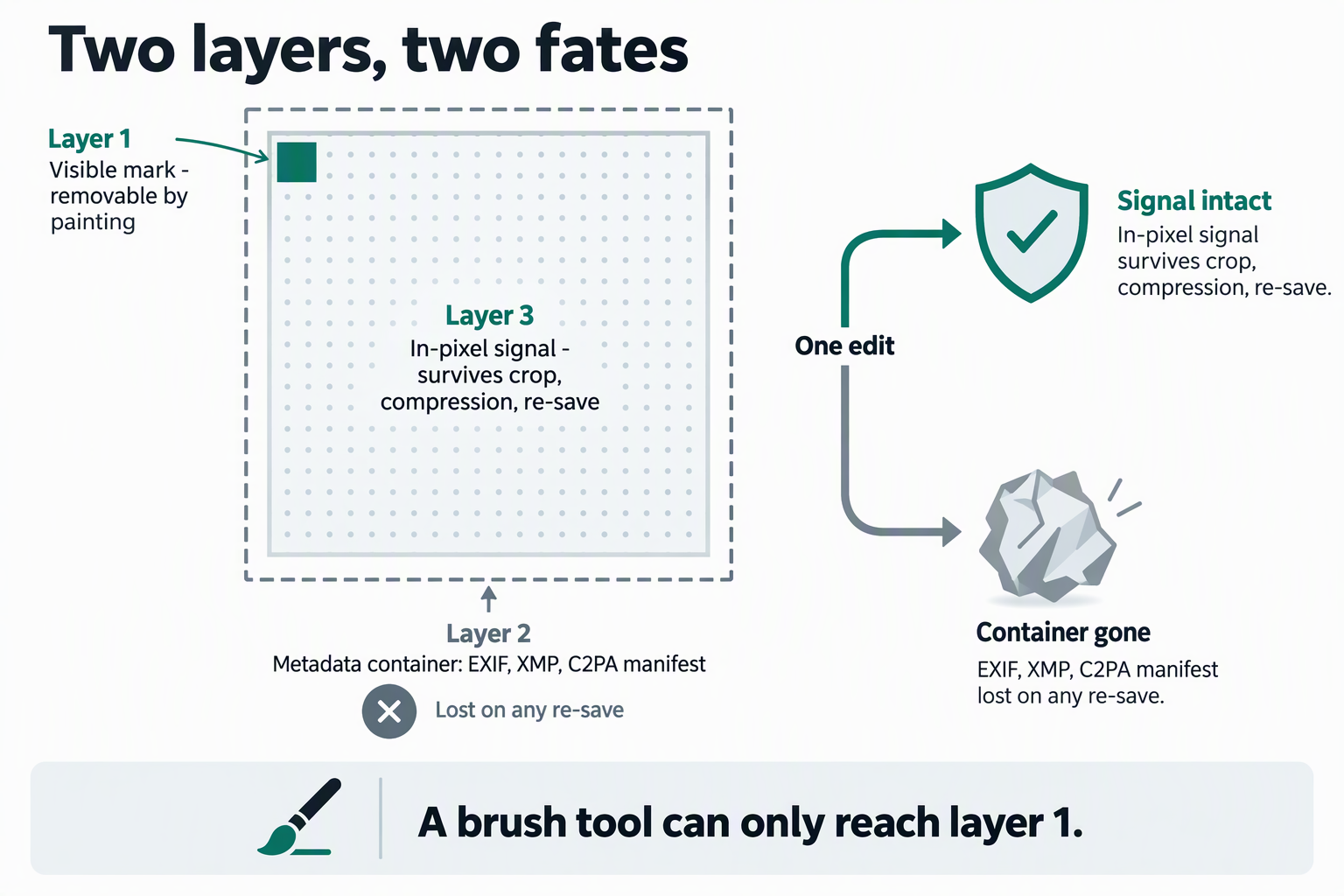
| Where it lives | In pixels you can see: a logo, a name, a repeated translucent pattern | Two layers at once: a signed manifest stored in the file's metadata container, and an imperceptible signal carried in the pixels themselves |
| Who put it there | A stock library, a photographer, a brand, or a previous editor | The generator that produced the image |
| Can you see it | Yes, by definition | No. Google describes SynthID as "imperceptible to humans" |
| How it is removed | You mark the region and the tool reconstructs that region from its surroundings | Not by marking a region. The signal is spread across the whole image, not placed in one corner |
| What removal means | You get a clean copy of your own picture | You would be trying to defeat an attribution record, which is a different act with different consequences |
MarkVanish belongs entirely in the first column. It paints over what you point at, in your browser, and nothing more.
What a browser edit measurably does to provenance data
A canvas-based tool never sees a file container. It decodes the image to raw pixels, works on those pixels, and encodes a new file from them. To see what that costs, we built two test files and pushed them through exactly that pipeline: a 1200 × 800 JPEG carrying three metadata containers (an EXIF block, an XMP packet, and a C2PA-shaped APP11 box holding a JUMBF superbox — a synthetic stand-in, not a real signed manifest), and a PNG carrying a tEXt chunk. Every output was then byte-inspected.
| Path through the canvas | Output size | Metadata containers found in the output | Pixel change vs. decoded input (max / mean channel delta) |
|---|---|---|---|
| JPEG in → PNG out | 1,030,036 bytes | none | 0 / 0 |
| JPEG in → JPEG out, quality 0.92 | 146,119 bytes | none | 38 / 1.509 |
| JPEG in → WebP out, quality 0.92 | 68,704 bytes | none | 47 / 1.727 |
| PNG in → PNG out | 833,864 bytes | none | 0 / 0 |
| PNG in → JPEG out, quality 0.92 | 141,335 bytes | none | 89 / 2.612 |
| PNG in → WebP out, quality 0.92 | 61,438 bytes | none | 90 / 2.273 |
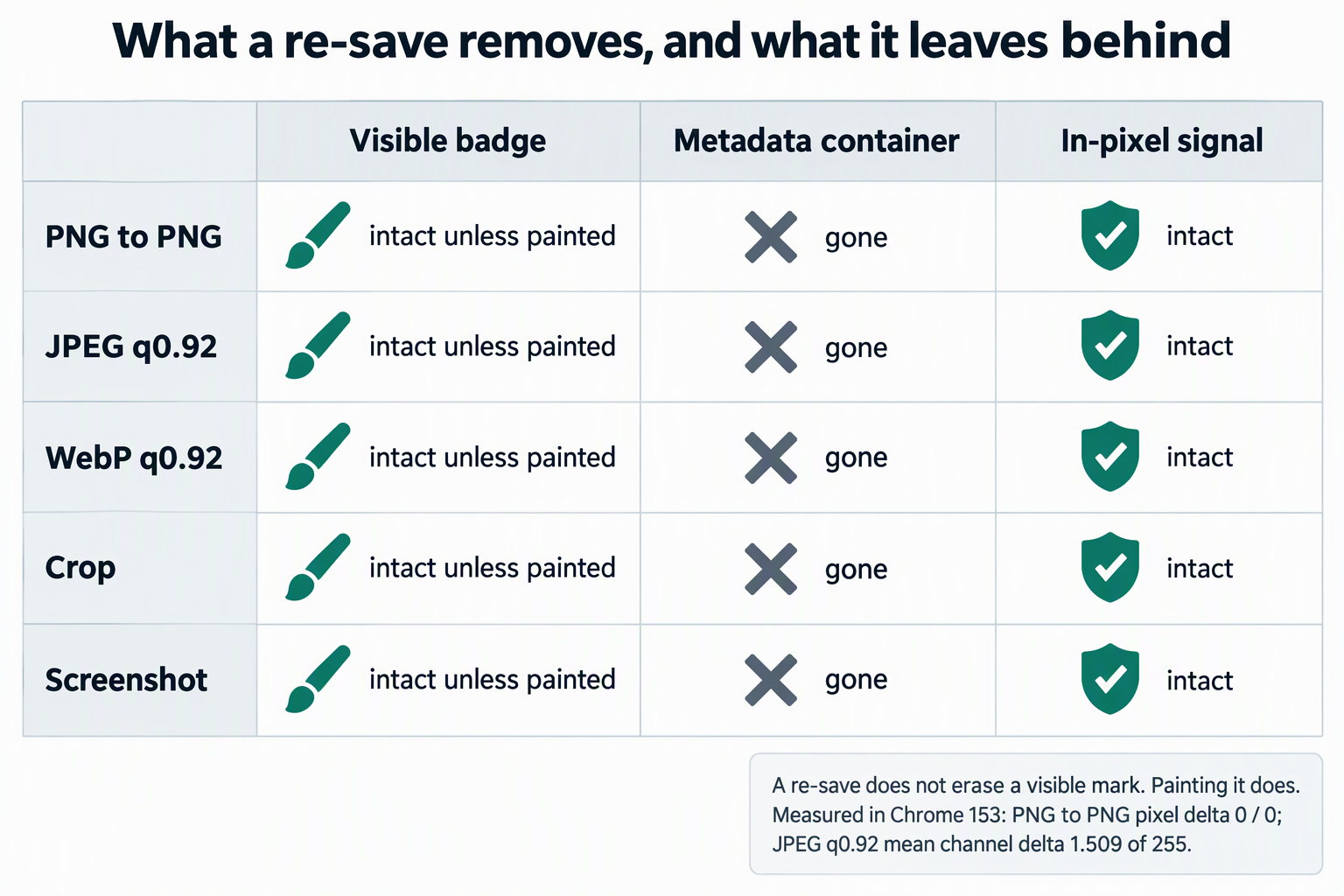
Read that table in two halves, because the two halves point in different directions.
- Every metadata container is gone. Not rewritten, not carried across: absent. The JPEG outputs begin with a JFIF header and nothing else; the PNG outputs contain
IHDRandIENDaround the image data with no text chunk. This is ordinary behaviour for a canvas re-encode, not a feature of this site, and the same thing happens in any editor that decodes to pixels and re-saves. - The pixels come through almost unchanged. PNG to PNG is bit-identical. A JPEG or WebP round trip moved the average channel value by about 1.5 to 2.7 out of 255. Anything carried inside those pixels is untouched by this process, which is precisely why in-pixel watermarking exists.
That combination is the whole answer. A visible-watermark remover can delete the metadata layer of provenance as a side effect of saving a new file, and it cannot do anything to the in-pixel layer, because the in-pixel layer is what the image now is. The practical consequence worth knowing: if you need to prove where a file came from, verify the original file before any edit, because the record that travels in the container does not survive the first re-save.
What the official sources actually say
Rather than paraphrase, here is what the parties building these systems publish.
- Google DeepMind, on SynthID: it "embeds digital watermarks directly into AI-generated images, audio, text or video" and they are "imperceptible to humans – but can be detected by SynthID's technology". For images it is "added the moment content is created, and designed to stand up to modifications like cropping, adding filters, changing frame rates, or lossy compression."
- Google, on checking a file in Gemini: two technologies are used, SynthID and Content Credentials. The stated limits matter: one file at a time, at most 100 MB, videos under 90 seconds, audio under an hour, and "Gemini can currently only recognize content created by Google AI tools". If no SynthID mark is found, that means it was not made by Google AI, "but it could have been created by other AI systems". Results can also come back unclear, with the documented reasons "Not enough details to watermark" and "Likely too small an edit".
- OpenAI, May 19, 2026 (updated July 31, 2026): content from DALL·E 3, ImageGen and Sora has carried Content Credentials since 2024, and OpenAI is now a C2PA Conforming Generator Product. On the limits of that layer, in its own words: "metadata is not foolproof. It can be stripped, lost through uploads and downloads, or broken by transformations like file format changes, resizing, or screenshots." To cover that gap it adds SynthID to images generated through ChatGPT, Codex, or the OpenAI API, because "watermarking can be more durable through transformations like screenshots, while metadata can provide more information than a watermark alone". Its public verification preview checks both signals and, when nothing is found, "will not make a definitive conclusion about whether the image was generated with OpenAI tools since provenance signals can in some cases be stripped". The July 31 update extends SynthID to supported audio and adds API access for verification.
- The C2PA Specification, v2.3: a "hard binding" is "one or more cryptographic hashes that uniquely identifies either the entire asset or a portion thereof", and it lets a validator confirm "that the asset has not been modified" because it matches "only this asset and no other, not even other assets derived from it or renditions produced from it". A "soft binding" is instead computed from the content, and includes "an invisible watermark embedded within the digital content". The manifest store itself is carried as JUMBF metadata inside the file container, not in the pixels.
Two independent vendors, one standard body, and the measurement above all say the same thing: metadata provenance is fragile, pixel provenance is durable, and that is why both layers are now deployed together.
The honest state of play on stripping an in-pixel mark
It has been done in research, and the conditions tell you what to make of any commercial claim. IEEE Spectrum reported in August 2025 on UnMarker, a universal attack presented at the 2025 IEEE Symposium on Security and Privacy. It does not look for where a mark is hidden; it changes the image's spectral frequencies across the whole picture. Reported results ranged from 57 percent to 100 percent of detectable watermarks removed depending on the scheme, with the author stating that UnMarker "successfully removed 79 percent" of marks on images carrying SynthID — a figure a Google DeepMind representative contested, saying the company measured a significantly lower success rate. The article notes the attack ran in roughly five minutes on a data-centre GPU, works best with slight cropping, and that some images pick up "slightly visible changes".
Three things follow for a normal reader. A real removal attack alters the entire image, not the region you would paint. It is research code on rented server hardware, not something a browser brush tool is doing while you wait. And if a website advertises that it "removes AI watermarks", the useful question is what it changes: if it only re-saves your file, it has removed metadata at most, and the in-pixel signal is still there.
MarkVanish does none of this. It has no watermark detector and no removal attack; it reconstructs the region you mark from the pixels around it. The verification method on that page shows how to confirm for yourself that the file never leaves the browser.
How to check whether an image came from an AI generator
- Start from the untouched original. A screenshot, a download from a chat app, or anything already re-saved may have lost the metadata layer. Where you have a choice, take the original export.
- For Google AI content, ask Gemini. Upload the file and ask whether it was created or edited by Google AI. Read the caveats as part of the answer: one file at a time, up to 100 MB, and only Google AI content is recognised.
- For OpenAI content, use the public verification preview. It checks for both Content Credentials and SynthID, and explicitly declines to make a definitive call when nothing is found.
- Look at Content Credentials where they are present. The C2PA-based record can show how the file was composed, what was edited, and whether AI was involved.
- Treat "not detected" as "not detected", never as "not AI". Google's own wording covers this: an absent mark means it was not made by Google AI, but it could have come from another generator.
What this site does and does not do
- It does remove a visible mark you paint over, running entirely in your browser, with no upload and no account.
- It does not detect provenance signals, strip SynthID, forge or repair Content Credentials, or make an AI-generated image unrecognisable. There is no model and no detector in the page.
- Painting out a visible corner badge removes the badge only. If that badge sat on an AI-generated image, the invisible signal in the pixels is still there afterwards, and the metadata layer will have been dropped by the re-save. Neither outcome is the same as "the watermark is gone".
- If the provenance record matters to you, keep the original. Edit a copy, not the file you may need to vouch for later.
Whether you may alter a particular image at all is a separate question, answered on the legal boundary page. Format behaviour is covered on supported image formats, and saving choices on output image format.
Frequently asked questions
Can a watermark remover remove the SynthID watermark?
No. SynthID is imperceptible and spread across the image, so there is no region to mark. Google states it is designed to stand up to cropping, filters and lossy compression. A brush-and-repair tool reconstructs a marked region from its surroundings; it has nothing to act on here.
Does editing an AI image delete its provenance metadata?
The metadata layer, yes. In our Chrome 153 test every container we planted — EXIF, XMP, and a C2PA-shaped APP11/JUMBF box — was absent from the re-encoded output, and a PNG text chunk disappeared too. This is normal canvas behaviour and matches OpenAI's own statement that metadata "can be stripped, lost through uploads and downloads, or broken by transformations like file format changes, resizing, or screenshots".
If the metadata is gone, is the image still marked?
If the generator also applied an in-pixel watermark, yes. That is the stated reason the two layers are combined: OpenAI describes watermarking as "more durable through transformations like screenshots" while metadata carries more detail. Dropping one layer does not drop the other.
Will re-saving, cropping, or screenshotting remove an in-pixel mark?
No. Google says SynthID is designed to stand up to cropping, filters, frame-rate changes and lossy compression, and OpenAI presents watermarking as more durable than metadata through screenshots. Our own round trip measured pixel changes of well under 1 percent on average, which is not the kind of disruption such an attack requires.
How can I check whether an image was generated by Google AI?
Upload it in the Gemini app and ask. Google documents the limits: one file at a time, at most 100 MB, videos under 90 seconds, audio under an hour, and only content created by Google AI is recognised. It also lists two reasons a result can come back unclear: not enough detail to watermark, or too small an edit.
How can I check whether an image came from OpenAI?
Use the public verification preview described in OpenAI's May 2026 announcement. It checks for Content Credentials and SynthID, and OpenAI notes it will not make a definitive conclusion when neither is found.
Does MarkVanish detect AI-generated images?
No. The tool pages contain no classifier and no watermark detector. They only reconstruct the region you paint; anything else you see described here is quoted from the generator's own documentation.
Is it legal to remove a watermark?
It depends on what the mark is, who owns the image, and what you intend to do with the result. That is answered separately, with the relevant statutes, on the legal boundary page.
Is my image uploaded when I use this site?
No. Processing happens in your browser. The verification page gives you the method to confirm that yourself with your browser's network panel.
Figures on this page come from a Chrome 153 headless run on Windows on September 26, 2026, using a 1200 × 800 test image and both decode paths used by the site's scripts. Quoted statements are taken from Google DeepMind's SynthID page, Google's Gemini Apps help page on verifying AI-generated content, OpenAI's "Advancing content provenance" announcement of May 19, 2026 as updated July 31, 2026, the C2PA Specification v2.3, and IEEE Spectrum's August 2025 report on UnMarker. Provenance tooling changes quickly; check the vendor's own page for current capability.